
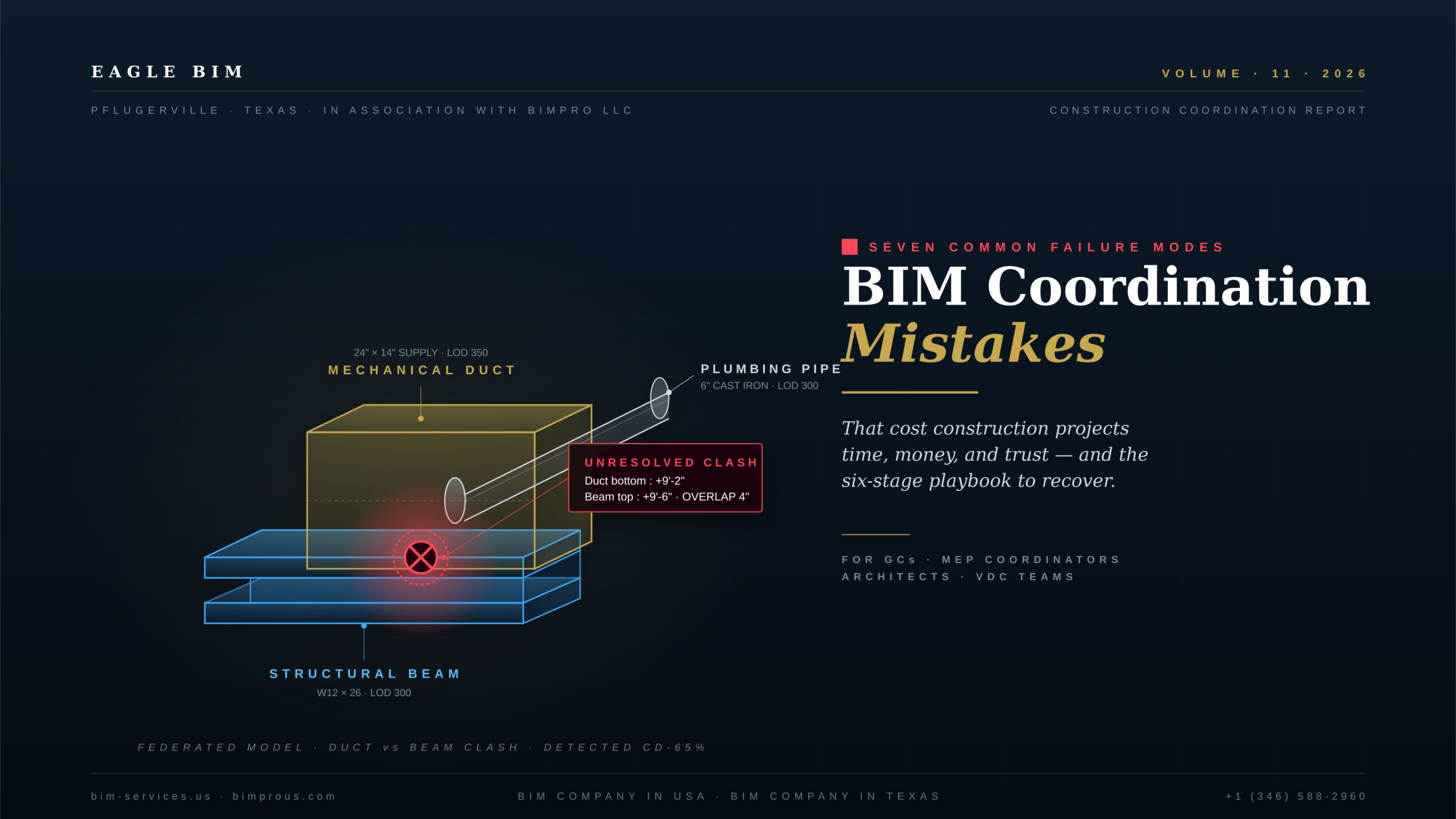
BIM coordination mistakes rarely look catastrophic in the model. They look like a routing decision deferred to next week, a discipline that joins coordination late, a clash report with 600 open issues that nobody owns, a federated model that no longer matches what the trades are building. Each individual decision feels small. Together they account for most of the rework, delay, and budget pressure that BIM coordination was supposed to eliminate.
This guide is the failure-mode catalog. Seven specific BIM coordination mistakes that show up on real construction projects, where each one starts, what it costs the project, and how to fix it. The article is built for the second-opinion conversation · the moment when a general contractor, MEP coordinator, or architecture firm looks at where a project actually is and tries to figure out whether the BIM coordination problems are the model, the process, the people, or all three. The seven BIM coordination mistakes documented here cover roughly 90 percent of the failure patterns Eagle BIM sees in audit engagements across Texas and the broader US.
The cost case for taking BIM coordination mistakes seriously is well documented. According to the Dodge Construction Network Not By Design SmartMarket Brief published in September 2024, 98 percent of contractors in the US and Canada have had projects with serious quality issues including errors, omissions, and rework in the last three years. Only 11 percent of field personnel report always having access to the information they need about what and where to build. Fewer than one-third of field personnel used BIM for coordination, conveying design intent, or clarification during jobsite project team meetings. The gap between BIM as an authoring environment and BIM as a coordination practice is where most BIM project failures live.
Two related Eagle BIM articles set context: BIM Level of Development (LOD) explains the LOD progression that anchors model coordination, and What Is BIM Coordination explains the overall practice that BIM coordination mistakes undermine.
Why BIM Coordination Mistakes Happen Even When Everyone Means Well
| BIM coordination mistakes happen primarily because BIM is treated as a technology rather than a process. Software gets installed, models get authored, but the decisions about who federates which models when, at what LOD, with what cadence, and who owns clash resolution rarely get documented and enforced. Add staffing turnover, late-arriving disciplines, and version-control drift, and a project that looks coordinated in week 4 has stopped being coordinated by week 16 without anyone explicitly making a bad decision. The seven BIM coordination mistakes below are the seven most common failure patterns. |
Most BIM coordination mistakes are not technical failures. The disciplines all have competent BIM teams. The software all works. The federated viewer renders the model. What goes wrong is the operating system around the model · the cadence, the responsibility assignments, the LOD discipline, the version control, the clash resolution accountability. These are process and management problems wearing technology clothing.
The pattern is consistent across project types. A general contractor wins a project, the architect’s BIM team starts modeling, structural joins a few weeks behind, MEP joins a few more weeks behind that. By the time everyone is in the federated environment, the architectural model has matured to LOD 300 and the MEP team is still at LOD 200. The first federation run produces 800 clashes, most of them false positives caused by LOD mismatch issues. Nobody has time to triage them carefully so the team filters and ignores. Three weeks later the backlog is 1,400 issues. The team commits to a clash-resolution cadence that never quite materializes because the trade contractors are juggling four other projects.
That story is the structural cause of most BIM coordination problems Eagle BIM gets called in to audit. Nobody did anything obviously wrong. Everyone meant well. The project still went sideways. The seven BIM coordination mistakes documented below are the specific failure modes that emerge from that structural pattern · each one with a clear definition, a typical cost signature, and a fix.
Mistake One · Starting BIM Coordination Too Late in the Project
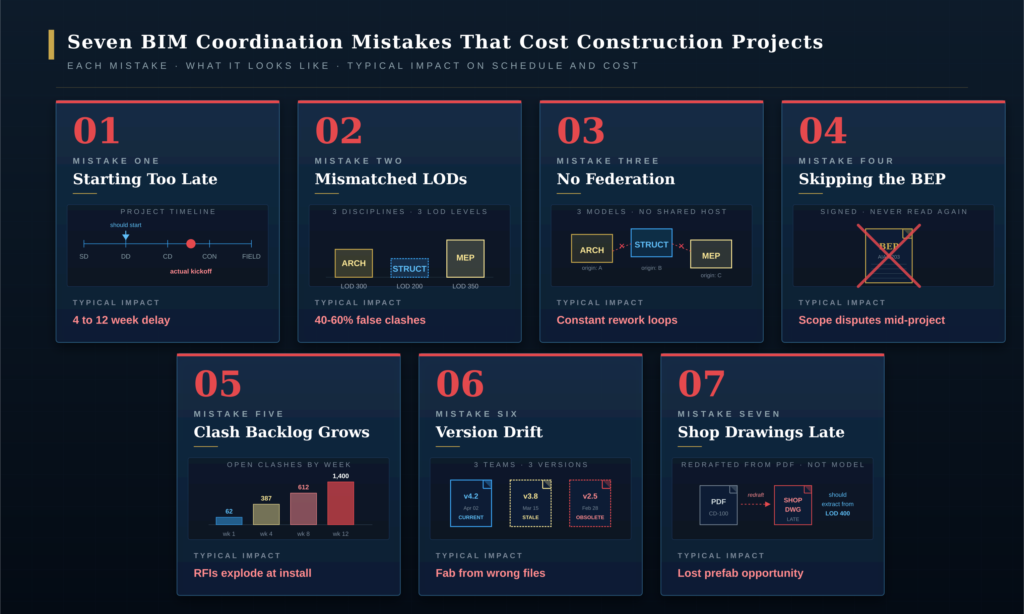
| BIM coordination should start at the beginning of Design Development (DD), not after Construction Documents (CD) are issued. Starting coordination late means structural framing decisions are locked before MEP routing is studied · MEP teams are then forced to work around structural rather than coordinated alongside it. The typical delay impact is 4 to 12 weeks added to the project schedule plus 15 to 25 percent more rework than projects with early coordination. |
What this mistake looks like. Coordination kickoff scheduled for after CDs are 80 percent complete. Structural drawings already stamped. MEP layouts done in CAD with no coordinated reference. The federated model gets assembled for the first time during the constructability review phase, which is the worst possible moment · everything is committed but nothing is verified. This is the most common starting point for the BIM coordination mistakes that cascade through the rest of the project.
Why it happens. The procurement structure rewards it. Owners often hold off engaging the construction manager and trade contractors until after the design is essentially complete. The architect and engineer believe their job is to produce a coordinated design package, not to convene a multi-trade BIM coordination effort. By the time the trades are on board with their models, the design team has moved on to other projects. This is one of the most expensive BIM coordination mistakes because it forces a sequential rather than parallel workflow. Late-start BIM coordination mistakes also poison the BEP negotiation that should have happened earlier · by the time everyone is ready to coordinate, the BEP either does not exist or is too late to enforce.
What it costs. Schedule impact is the worst part. Coordination issues that would have taken hours to resolve at DD now take days to resolve at CD because they require change orders, revised drawings, and stakeholder coordination. The typical Eagle BIM audit on a project with late-start BIM coordination mistakes finds 4 to 12 weeks of schedule slip directly attributable to the late start, plus 15 to 25 percent more rework hours through CD than comparable projects with early coordination. Late-start BIM coordination mistakes also cascade · they create artificial schedule pressure that forces compromises on every subsequent coordination decision.
How to fix it. Convene the BIM coordination kickoff at the start of DD, not at CD. The BIM Execution Plan (BEP) is signed before any modeling work begins. The architect’s model and the engineer’s models start at compatible LOD and the federated model is assembled at the end of DD-30. Trade contractors are engaged with their BIM models by the end of DD if procurement allows. If procurement forces a later trade-contractor engagement, the design team’s BIM coordinator pre-positions the model with placeholder MEP volumes so the trade BIM teams have something to coordinate against. Avoiding this first set of BIM coordination mistakes is the single highest-leverage decision a project team makes in the first 60 days of design. Early-start projects experience roughly 70 percent fewer downstream BIM coordination mistakes than late-start projects of comparable complexity.
Mistake Two · Mismatched LODs Across Disciplines
| LOD mismatch issues occur when disciplines model at different Levels of Development without an agreed coordination plan. Architectural at LOD 300, structural at LOD 200, MEP at LOD 350 produces a federated model that cannot be clash-detected meaningfully · 40 to 60 percent of detected clashes turn out to be false positives caused by LOD differences rather than real construction conflicts. The fix is a BIMForum USA LOD Specification table in the BIM Execution Plan that locks every discipline’s element-by-element LOD progression by phase. |
What this mistake looks like. A clash report with hundreds of issues, most of which the coordinator dismisses on inspection because they are not real clashes · they are LOD artifacts. Generic structural columns that are larger than they will actually be. MEP equipment placeholders that overlap walls because the equipment will be smaller. Cable trays modeled at full bundle width when only 30 percent of the bundle is at the modeled position. The team loses confidence in the clash report and starts filtering or ignoring it · which guarantees real clashes get missed. These BIM coordination mistakes are easy to misdiagnose as detection problems when they are actually agreement problems.
Why it happens. The BIM Execution Plan was either not written or was written without enforceable LOD agreements per element. Each discipline modeled at the LOD their internal standards default to without checking what the coordination effort needed. Many teams confuse Level of Detail (graphic richness) with Level of Development (reliability), so they think a richer-looking model is a more coordinated model · which is incorrect. These federated model errors are some of the most demoralizing BIM coordination mistakes because they make the coordination effort itself seem like wasted work. LOD-mismatch BIM coordination mistakes also tend to recur in successive projects from the same firm until the BEP discipline is fixed at the organizational level.
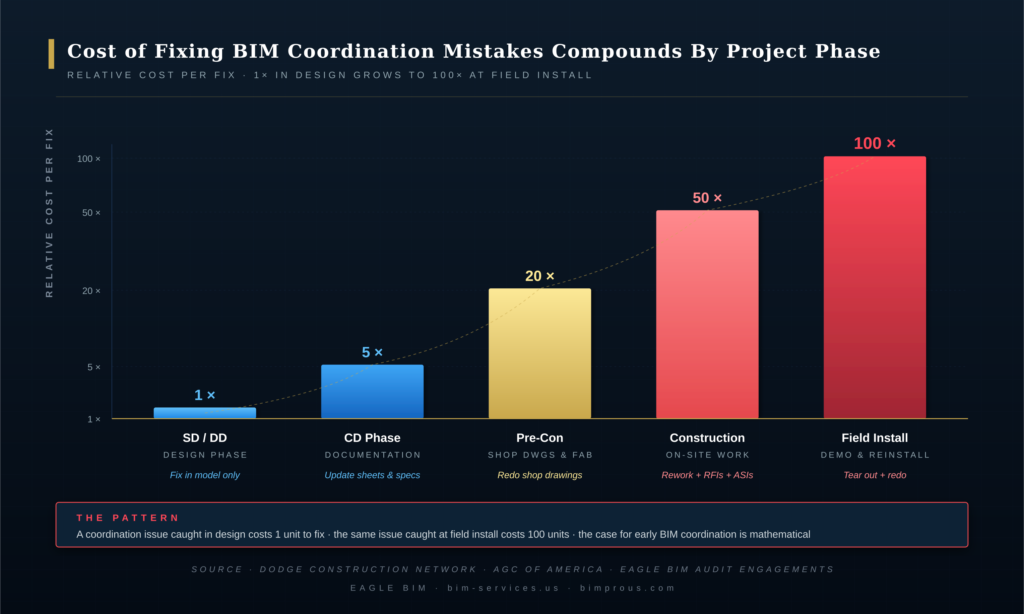
What it costs. The direct cost is the wasted coordination meeting hours triaging false clashes. The bigger cost is the loss of trust in the federated model. Once a team has been burned by 600 false-positive clashes, they stop reading clash reports carefully. Real clashes hide in plain sight. The contractor finds them in the field at 100 times the cost they would have been to fix in the model. Of all the BIM coordination mistakes that cause schedule slip, LOD mismatch is the most insidious because the symptoms look like the team is over-coordinating when they are actually under-coordinating. The downstream effect of LOD-mismatch BIM coordination mistakes is that the team eventually disengages from coordination entirely · which converts a process problem into a cultural one.
How to fix it. Every BIM Execution Plan needs a LOD table that references the BIMForum USA LOD Specification element-by-element for every discipline at every phase. The architect’s exterior walls are LOD 300 at DD-100, LOD 350 at CD-50. The structural columns are LOD 200 at DD-50, LOD 300 at CD-30, LOD 350 at CD-100. The MEP main runs are LOD 300 at DD-100, LOD 400 at CD-100 for the prefabricated portions. Every clash detection run runs against agreed LOD, so false positives stay below 10 percent and the team trusts the report. This is the single most effective intervention against BIM coordination mistakes rooted in LOD mismatch issues.
| Suspect your project has BIM coordination mistakes?
Eagle BIM audits troubled BIM coordination efforts in 7 to 14 days · we identify which of the seven mistakes are present, document cost and schedule impact, and deliver a prioritized recovery plan you can execute internally or with our help. |
Mistake Three · No Federation Strategy
| No federation strategy means the federated model has no defined host, no shared coordinate system, no agreed update cadence, and no defined ownership for resolving conflicts at the federation level. Disciplines submit models that look fine individually but cannot be combined into a coherent federated view. Federated model errors then dominate every coordination meeting. The fix is a federation plan documented in the BEP · who hosts, what coordinate system, what cadence, what file naming, what shared parameters. |
What this mistake looks like. The architect publishes a Revit file. The structural engineer publishes a different Revit file with structural elements offset by 50 feet because of a project base point mismatch. The MEP team publishes a Navisworks NWC export from CAD instead of Revit because their team works in CAD. The federation host opens all three and nothing aligns. Two hours of every coordination meeting are spent figuring out which file is current and how to align coordinates. These are the BIM coordination mistakes that produce the most visible chaos in coordination meetings.
Why it happens. The team assumed federation would work itself out because the software supports it. Nobody documented the coordinate system, the project base point, the survey point, the file naming convention, the update cadence, or the model linking strategy. Each discipline solved its own modeling problem in its own way and assumed the others would adapt. These BIM implementation mistakes tend to compound silently · the project looks fine for the first few weeks and then federation becomes an ongoing crisis. Eagle BIM has audited multiple projects where the federation-related BIM coordination mistakes alone accounted for 30 to 40 percent of coordination meeting time.
What it costs. Constant rework loops. Every coordination meeting starts with a 30-minute alignment exercise. Clash reports run against misaligned models produce thousands of meaningless results. The team eventually stops federating altogether and reverts to discipline-by-discipline review, which defeats the entire purpose of BIM coordination. Of all the BIM coordination mistakes examined in this guide, the no-federation pattern is the one most likely to make a project team abandon BIM coordination practice entirely · which is the worst possible outcome. Federation-based BIM coordination mistakes also create downstream version-drift issues because each discipline starts caching its own version of what it thinks is current.
How to fix it. The BIM Execution Plan defines federation explicitly. One host model (usually the architectural Revit central file). One coordinate system (typically the architect’s project base point and shared coordinates). One update cadence (weekly Friday by 5pm for example). One file naming convention. One agreement on linked versus shared parameters. One designated federation owner (often the GC’s VDC manager or a third-party coordinator like Eagle BIM). Federation becomes a routine maintenance task rather than a recurring crisis. A clean federation strategy is the cheapest prevention available against the most damaging category of BIM coordination mistakes.
Mistake Four · Skipping the BEP or Treating It as a Formality
| Skipping the BIM Execution Plan (BEP) · or producing one to satisfy a contract requirement and never using it · is the root cause of most BIM coordination mistakes. The BEP defines roles, LOD per element per phase, federation strategy, clash resolution cadence, and shared parameters. Without an enforced BEP, every coordination decision becomes a negotiation under deadline pressure. AIA G203-2022 is the current US BEP standard · use it as the template rather than starting from scratch. |
What this mistake looks like. A BEP document exists in the project files. It is 40 pages long. Nobody on the project team has read it in three months. Decisions about LOD, federation cadence, and clash ownership are being made ad-hoc in coordination meetings. The BEP says clash detection runs weekly · in practice it runs whenever someone has bandwidth. The BEP says architectural is the host model · in practice three different parties have hosted the federation at various points. The BEP becomes the source of BIM coordination mistakes rather than the prevention mechanism it was meant to be.
Why it happens. The BEP was treated as a contract deliverable rather than an operating document. It was written by a BIM manager who is no longer on the project. The team that has to follow it was not in the room when it was written, so they have no buy-in. The BEP has not been updated as the project evolved · so even where someone reads it, the instructions no longer match reality. These are some of the most preventable BIM coordination mistakes because the fix is purely organizational. BEP-related BIM coordination mistakes also tend to mask their own cause · teams attribute downstream problems to the model or the trades rather than tracing back to the unenforced BEP.
What it costs. Scope disputes mid-project. The contractor argues that LOD 400 fabrication coordination is out of the architect’s scope; the architect says it was always included. The MEP coordinator says clash resolution is the GC’s responsibility; the GC says it was always the MEP coordinator’s. None of these disputes get resolved fast because the BEP that was supposed to settle them has been ignored for so long that nobody trusts it as the source of truth. The BIM coordination mistakes rooted in BEP neglect compound through every phase · what starts as a documentation gap ends as litigation. BEP-neglect BIM coordination mistakes also tend to surface during the final 20 percent of CD when stakes are highest and remediation is most expensive.
How to fix it. Use AIA G203-2022 as the BEP template. Hold a BEP workshop with all key stakeholders before any modeling begins · the BEP is what they agreed to in that workshop, not what a BIM manager wrote in a vacuum. Review the BEP at every phase gate (end of DD, end of CD, start of construction) and update it explicitly. Print the LOD table and the federation cadence on the wall of every coordination meeting room. The BEP is a living document or it is dead weight. Preventing BEP-related BIM coordination mistakes is the cheapest insurance available on any BIM-driven construction project.
Mistake Five · Letting Clash Reports Pile Up Without Resolution Cadence
| Clash reports are useful only when they have a resolution cadence and an accountable owner per clash. Without weekly resolution meetings and a clash-by-clash owner assignment, the backlog grows past 500 open issues and the team loses ability to triage. Most BIM coordination mistakes in the resolution phase are not detection failures · they are management failures. The fix is a weekly clash review meeting, a clash-tracking tool with owner and status per issue, and a 30-day resolution SLA per clash. |
What this mistake looks like. The federated model runs a clash detection report. It produces 387 clashes. The coordinator emails the report to the team. Three weeks pass. The next run produces 612 clashes (more disciplines, more model maturity, more clashes detected). Now there are 612 clashes nobody has triaged from week 4. The team filters out ‘minor’ clashes and tries to focus on the worst. By month 3 there are 1,400 open clashes and the team has lost track of which are real and which are LOD artifacts. This is one of the most common BIM coordination mistakes on long-running projects · the clash detection technology works perfectly, but the resolution workflow never gets built.
Why it happens. Clash detection is set up as a deliverable, not as a workflow. Someone runs the report. The report exists. The clashes are not assigned to specific owners with deadlines. Without an owner per clash, no clash gets resolved · because every clash sits in a queue waiting for someone to claim it, and the people who should claim them have other priorities. This is one of the most chronic BIM coordination mistakes Eagle BIM sees on long-running projects. Resolution-stage BIM coordination mistakes are also the most demoralizing for the team because the detection work already happened · the value just never got captured.
What it costs. Field RFIs explode at install. Every unresolved clash that should have been caught in the model becomes a field issue the contractor has to RFI. RFI response cycles take 7 to 14 days. Field crews stop working while they wait. Schedule slips by weeks. Cost grows by tens of thousands of dollars per major unresolved clash that hits the field. The Dodge Construction Network 2024 SmartMarket data on the true cost of poor collaboration documents exactly this pattern at industry scale. These are the BIM coordination mistakes with the highest direct cost per incident because the cost compounds with every day the issue stays unresolved.
How to fix it. Weekly clash review meeting on a fixed day and time, attended by the BIM coordinators from each discipline. Every clash assigned an owner (usually the discipline that should resolve it) and a status (open, in progress, pending information, resolved). A clash-tracking tool · Navisworks with BIM 360 issues, BIM Collab, BIM Track, or equivalent · holds the data. Each clash has a 30-day resolution SLA. The backlog stays under 100 open issues. The coordinator publishes the burn-down chart so leadership can see progress weekly. The weekly cadence is what separates effective coordination from accumulating BIM coordination mistakes · no tool replaces the discipline of a fixed weekly review.
Mistake Six · Version Drift and Source File Chaos
| Version drift happens when different trade teams work from different versions of the same source file · structural Revit 2024 here, structural Revit 2022 there, an outdated architectural background that is two months stale. The federation looks coordinated but the fabrication drawings come from the wrong source. Version drift is one of the most expensive BIM coordination mistakes because it surfaces during fabrication, not during model coordination. The fix is a single common data environment (BIM 360, ACC, ProjectWise) with enforced check-out / check-in and version-locked exports. |
What this mistake looks like. The mechanical sub fabricates duct based on a coordinated Revit file dated March 15. The architectural team revised the corridor ceiling height on April 2 to accommodate a structural beam relocation. The mechanical sub didn’t get the April 2 file because it was emailed instead of posted to the shared environment, and the email got buried. The duct fabricates 12 inches too tall for the new ceiling and arrives at site before anyone realizes the discrepancy. Version-drift BIM coordination mistakes are uniquely painful because they look like everything is working until the fabricated piece arrives wrong.
Why it happens. The project uses email for model distribution instead of a common data environment. Or the project uses a CDE but the access controls are unclear so people work from local copies. Or the CDE exists but nobody enforces version control · multiple ‘final’ files exist with conflicting content. Each scenario produces the same outcome · the team thinks they are coordinated when they are working from different sources. These are silent BIM coordination mistakes until they appear in the field. Version-drift BIM coordination mistakes are especially common on projects with high subcontractor count because each sub maintains its own local cache.
What it costs. Fabrication from wrong drawings. The most expensive form of rework because it includes material waste, fabrication labor waste, shipping waste, demolition labor, and reinstall labor. A single 40-foot duct section fabricated to the wrong dimension can cost thousands of dollars in direct costs plus a week of schedule delay. Multiply by 5 to 10 incidents per project and version drift alone accounts for measurable percentages of the project budget. Among all the BIM coordination mistakes documented in this guide, version drift has the worst cost-per-incident profile because every incident reaches fabrication before anyone catches it.
How to fix it. One common data environment for the project · Autodesk BIM 360, Autodesk Construction Cloud (ACC), Bentley ProjectWise, or equivalent. Email is for notifications, never for files. The CDE has access controls that prevent edits to current-version files without an explicit check-out. Exports for fabrication are version-locked PDFs with a clear revision number printed on every sheet. Trade contractors confirm they are working from the latest revision number before starting fabrication. The CDE is the single source of truth · no exceptions. A disciplined CDE eliminates entire categories of BIM coordination mistakes at the cost of a single workflow change.
Mistake Seven · Treating Shop Drawings as an Afterthought
| Treating shop drawings as a separate, post-CD activity wastes the coordination work already done in the model. When shop drawings get redrafted in 2D from PDF construction drawings instead of extracted from the coordinated LOD 400 model, every coordination decision has to be rediscovered. The prefabrication opportunity is lost. The fix is to plan the LOD 400 progression in the BEP from the start, so shop drawings extract from the model rather than being redrafted. |
What this mistake looks like. The federated model reaches LOD 300 at CD-100. The architect issues stamped construction documents. The trade contractors then start their shop drawing process by opening the PDF CDs in their own CAD environment and drafting their own shop drawings from scratch. The trade contractor’s BIM team may or may not look at the federated Revit model. The shop drawings are technically based on the same design intent but they are not extracted from the coordinated model · they are redrafted from the printed output of the coordinated model. This is among the most expensive BIM coordination mistakes because all the coordination work upstream gets discarded at the fabrication handoff.
Why it happens. The trade contractors were not part of the BIM coordination effort during DD and CD. Their fabrication workflow assumes 2D PDF input. Their BIM teams (if they have them) maintain separate fabrication models that are not federated with the design model. The BEP never specified an LOD 400 progression for the elements that needed it. The BIM coordination mistakes here are not in the coordination effort itself · they are in the connection between coordination and fabrication. These handoff-stage BIM coordination mistakes are often invisible until prefabrication scheduling forces the question.
What it costs. Lost prefabrication opportunity. Multi-trade prefab racks for corridors in multifamily, MEP racks in healthcare, and skid-mounted equipment in data centers all depend on coordinated LOD 400 model output. When shop drawings are redrafted from PDF instead of extracted from the model, the prefab option disappears and the project loses the 20 to 30 percent labor savings that prefab typically delivers. This is one of the few BIM coordination mistakes where the cost shows up as opportunity cost rather than direct rework · which makes it easy to overlook in post-project reviews.
How to fix it. The BEP includes an LOD 400 progression for the elements that will be prefabricated or fabricated. Trade contractors with fabrication scope are engaged with their BIM teams during DD or early CD, not after CD issuance. The shop drawing process is defined as extraction from the federated model, with the trade contractor’s BIM team responsible for moving their elements from LOD 300 to LOD 400 in coordination with the design team. The shop drawings become a downstream view of the coordinated model rather than a redrafted parallel artifact. Eliminating this last category of BIM coordination mistakes unlocks the full prefabrication payback that BIM was supposed to deliver in the first place.
The Pattern Behind All Seven BIM Coordination Mistakes
| All seven BIM coordination mistakes trace back to a single root cause: BIM treated as a technology rather than a coordination practice with explicit roles, cadence, and ownership. Projects that avoid these mistakes treat the BIM Execution Plan as a living operating document, enforce a weekly coordination cadence, lock LOD progression per element per phase, federate against one host model in one common data environment, and connect coordination directly to fabrication through LOD 400 shop drawing extraction. The pattern is process discipline. |
Looking at all seven BIM coordination mistakes together, the same underlying issue surfaces every time. The technology works. The software produces the federated views, runs the clash detection, exports the shop drawings. What goes wrong is the operating system around the technology · the cadence, the ownership assignments, the LOD discipline, the version control, the connection to fabrication. The seven BIM coordination mistakes are not seven independent failure modes · they are seven symptoms of the same management gap.
Projects that genuinely avoid most BIM coordination mistakes share five characteristics. They treat the BEP as a living operating document that gets reviewed and updated at every phase gate. They enforce a weekly coordination cadence with a named owner per clash and a 30-day resolution SLA. They lock LOD progression per element per phase in a table that references the BIMForum USA LOD Specification. They federate against one host model in one common data environment with version control. And they connect coordination directly to fabrication through planned LOD 400 progression so shop drawings extract from the coordinated model rather than being redrafted from PDF outputs.
None of these five practices requires new technology. All five require management discipline · which is harder to deploy than software because it requires ongoing attention rather than a one-time purchase. The BIM project risk that creates BIM coordination problems is almost always a management gap rather than a technology gap. The AGC of America BIM Education Program and CM-BIM credential were created specifically to address this management dimension of BIM practice, recognizing that the technology training alone is not sufficient. Firms that have institutionalized prevention of BIM coordination mistakes typically have a named BIM manager with explicit authority over BEP enforcement, weekly cadence, and clash ownership · not a part-time coordinator.
How to Recover From BIM Coordination Mistakes Mid-Project
| Mid-project recovery from BIM coordination mistakes follows a six-stage playbook · Diagnose (week 1), Stabilize (week 1-2), Federate (week 2-3), Re-coordinate (week 3-6), Cadence (ongoing), Handoff (project close). The goal is to stabilize without starting over · most troubled projects can be recovered without redoing CDs. Recovery typically runs 4 to 6 weeks for a mid-CD project. The weekly cadence established in stage 5 becomes permanent and prevents the same mistakes from returning. |
Most projects with BIM coordination mistakes can be recovered. The federated model rarely needs to be rebuilt from scratch · what needs to be rebuilt is the coordination practice around the model. Eagle BIM has executed this recovery playbook on multiple troubled projects across Texas and the broader US market. The pattern below is what works. Mid-project recovery from BIM coordination mistakes is fundamentally an organizational intervention rather than a technical one · the model is usually salvageable, but the coordination process around it has to be rebuilt.
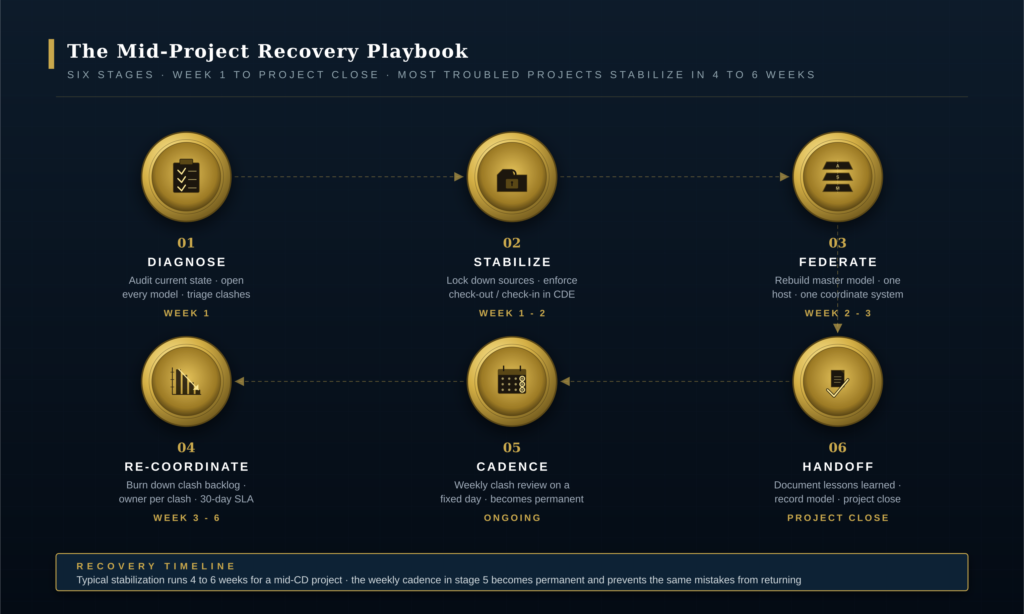
Stage 1 · Diagnose (Week 1). Audit the current state. Open every model file. Document the federation strategy (or lack of one). Read the BEP (if it exists) and compare it to actual practice. Pull the clash backlog and triage. Interview the BIM coordinators from each discipline about what is working and what is not. The diagnostic produces a written assessment with specific findings · this mistake is happening here, that mistake is happening there, here is the priority order to fix them. The diagnostic stage is where the specific BIM coordination mistakes affecting this project get named and ranked by impact.
Stage 2 · Stabilize (Week 1-2). Lock down sources. Move all model files into one common data environment if they are not already there. Enforce check-out / check-in. Stop any further uncoordinated modeling work until the recovery plan is in place. Communicate explicitly to all stakeholders that the project is in coordination recovery and that the next 4 to 6 weeks will focus on stabilization rather than new scope. Stabilization stops the BIM coordination mistakes from compounding while the deeper fixes get implemented in stages 3 through 5.
Stage 3 · Federate (Week 2-3). Rebuild the federated master model with a corrected coordinate system, agreed host, and clean linking. Re-export all discipline models from current sources. Run a baseline clash detection report. The baseline is the starting point for recovery measurement · everything from here is improvement against this number. Stage 3 is where the original BIM coordination mistakes around federation get explicitly corrected before the burn-down work begins.
Stage 4 · Re-coordinate (Week 3-6). Burn down the clash backlog. Weekly clash resolution meetings. Owner-assigned per clash with 30-day SLA. The recovered project should clear 70 to 80 percent of open clashes in this phase, with the remaining 20 to 30 percent typically being legitimate design questions that need owner decisions rather than coordinator decisions. This stage is where most of the visible recovery from earlier BIM coordination mistakes happens · the clash backlog dropping from thousands to dozens signals to the project team that stabilization is working.
Stage 5 · Cadence (Ongoing). The weekly review rhythm established during recovery becomes permanent for the rest of the project. The recovery owner (often Eagle BIM during a recovery engagement) hands the cadence over to the GC’s VDC team or to the architect’s BIM coordinator depending on project structure. This is the most important stage because it prevents the recovered project from drifting back into the same BIM coordination mistakes that caused the original problem. Without an embedded weekly cadence, recovered projects regress to the same BIM coordination mistakes within 2 to 3 months.
Stage 6 · Handoff (Project close). The permanent fix is in place. The federated model is current. The clash backlog is under control. The shop drawing process extracts from the model. The lessons learned from the recovery get documented for the owner’s facility management team and for the firms’ internal BIM playbook. The project moves to record model / as-built model production and project close. Recovery handoff is also where the team documents which BIM coordination mistakes originally affected the project · this documentation feeds the firm’s next-project BEP and prevents the same mistakes from recurring.
How Eagle BIM Audits BIM Coordination Mistakes on Troubled Projects
| Eagle BIM audits troubled coordination efforts in 7 to 14 days and delivers a written recovery plan with prioritized fixes, owner assignments, and a 4 to 6 week stabilization timeline. We work on Texas and US projects across multifamily, healthcare, semiconductor, data center, and commercial. The audit is no-obligation past the audit phase · clients can take the report internally or engage Eagle BIM for the recovery execution. Most BIM coordination mistakes are recoverable without starting CDs over. |
Eagle BIM, in association with BIMPRO LLC, is regularly engaged to audit troubled BIM coordination efforts on construction projects affected by BIM coordination mistakes. The audit pattern is the same regardless of project type. A 7 to 14 day diagnostic period, a written assessment, and a recommended recovery plan. Clients have full discretion to execute the plan internally, engage a different firm, or engage Eagle BIM for the recovery. Most engagements convert to execution because the audit team is already up to speed on the project. The audit is also frequently used as a defensive second-opinion review when a project team suspects BIM coordination mistakes but is not yet ready to commit to a recovery.
Typical audit scope: review all model files in current state, document federation strategy versus BEP versus actual practice, triage the clash backlog, interview the BIM coordinators from each discipline, identify which of the seven BIM coordination mistakes are present and at what severity, document the cost and schedule impact, and produce a prioritized recovery plan with stage gates and owner assignments. Deliverable is a written report typically 20 to 40 pages depending on project complexity. Each Eagle BIM audit explicitly maps the project’s specific issues to the seven canonical BIM coordination mistakes documented in this guide · which makes the report immediately actionable for the client’s internal team.
Eagle BIM’s audit experience covers all building types where BIM coordination mistakes commonly occur. Multifamily projects with podium / wrap structural complications and high MEP density. Healthcare expansions with active facility constraints and high coordination demand. Semiconductor fabs and data centers with extreme MEP coordination requirements. Commercial projects with aggressive schedules that compress the coordination window. The pattern of BIM coordination mistakes varies by building type but the recovery playbook is consistent. Multifamily projects most frequently exhibit late-start and version-drift BIM coordination mistakes; healthcare and semiconductor projects skew toward LOD-mismatch and clash-backlog issues.
For deeper context on related Eagle BIM practice areas, see BIM Level of Development, What Is BIM Coordination, and Eagle BIM Consulting Services.
| Need an independent BIM coordination audit?
Send Eagle BIM your current federated model, the BEP (if it exists), and a brief project context. We will deliver a written audit in 7 to 14 days · what mistakes are present, what they’re costing, and a prioritized recovery plan you can act on immediately. |
Frequently Asked Questions
These are the questions Eagle BIM hears most often from GCs, MEP coordinators, and architects diagnosing BIM coordination mistakes on their own projects. Answers are short and direct, optimized for both decision-making and AI search citation.
What are the most common BIM coordination mistakes?
The seven most common BIM coordination mistakes are starting coordination too late in the project, mismatched LODs across disciplines, no federation strategy, skipping or ignoring the BIM Execution Plan (BEP), letting clash reports pile up without resolution cadence, version drift and source file chaos, and treating shop drawings as a separate post-CD afterthought. Most troubled projects exhibit three or more of these patterns simultaneously. The cumulative effect of multiple co-occurring BIM coordination mistakes is what produces the visible schedule slip and budget overruns that prompt second-opinion audits.
Why do BIM coordination efforts fail?
Why BIM coordination fails is almost always a process and management issue, not a technology issue. The software works. The models exist. What goes wrong is the operating system around the model · the cadence, the role assignments, the LOD discipline, the version control, the clash resolution accountability. Projects that succeed treat BIM as a coordination practice with explicit weekly rhythm and named owners per task, not as a software deployment. Most BIM coordination mistakes trace back to this single management gap rather than to any specific technology limitation.
When should BIM coordination start on a construction project?
BIM coordination should start at the beginning of Design Development (DD), not after Construction Documents (CD) are issued. The BIM Execution Plan is signed before any modeling work begins. The first federation run happens at DD-30. Trade contractors are engaged with their BIM models by end of DD if procurement allows. Starting coordination after CD issuance is one of the most expensive BIM coordination mistakes because it forces sequential rather than parallel workflow. Project teams that successfully avoid late-start BIM coordination mistakes typically convene a BEP workshop within the first 30 days of the project.
What is the cost impact of late clash resolution?
A coordination issue caught in design costs roughly 1 unit to fix. The same issue caught at CD costs 5 units. At pre-construction shop drawing phase, 20 units. During construction, 50 units. At field install requiring tear-out and reinstall, 100 units. This 1× to 100× pattern is the central economic argument for taking BIM coordination mistakes seriously at the start of a project rather than discovering them in the field. The pattern is consistent across published industry research including the Dodge Construction Network Not By Design SmartMarket Brief (September 2024), which documented that 98 percent of US and Canada contractors had projects with serious quality issues including errors, omissions, and rework in the last three years.
How long does it take to recover a troubled BIM coordination effort?
Mid-project recovery from BIM coordination mistakes typically runs 4 to 6 weeks for a project in mid-CD phase. Recovery follows a six-stage playbook · diagnose (week 1), stabilize (week 1-2), federate (week 2-3), re-coordinate (week 3-6), cadence (ongoing), handoff (project close). The goal is to stabilize without starting over · most troubled projects can be recovered without redoing CDs from scratch. Longer recoveries are possible but uncommon.
What is a BIM Execution Plan (BEP) and why does skipping it cause mistakes?
The BIM Execution Plan (BEP) defines roles, LOD per element per phase, federation strategy, clash resolution cadence, shared parameters, and file management. AIA G203-2022 is the current US BEP template standard. Skipping the BEP or treating it as a one-time contract deliverable is the root cause of most BIM coordination mistakes because every coordination decision then becomes an ad-hoc negotiation under deadline pressure instead of an enforcement of pre-agreed protocol. Of the seven BIM coordination mistakes catalogued in this guide, BEP neglect is upstream of at least four of them.
How do I know if my project has BIM coordination problems?
Common signals of active BIM coordination mistakes include: clash backlog growing past 200 open issues with no resolution cadence, coordination meetings spent on file alignment rather than design decisions, RFIs in the field that reveal model conflicts that should have been caught earlier, fabrication errors that trace to outdated source files, trade contractors working from PDF rather than the coordinated model, and a BEP that nobody on the current team has read in months. Three or more of these signals typically indicate active BIM coordination problems that warrant an audit.
Can a project recover from BIM coordination mistakes without starting over?
Yes · in almost all cases. Most BIM coordination mistakes are recoverable without redoing CDs or restarting modeling work. The federated model itself rarely needs to be rebuilt from scratch · what needs to be rebuilt is the coordination practice around the model. The six-stage recovery playbook (diagnose, stabilize, federate, re-coordinate, cadence, handoff) typically delivers a stabilized project in 4 to 6 weeks. Genuine restart-from-scratch recoveries are rare and usually involve fundamental issues like wrong building geometry rather than coordination issues. Eagle BIM has executed this recovery playbook on BIM coordination mistakes across multifamily, healthcare, semiconductor, and data center projects.