
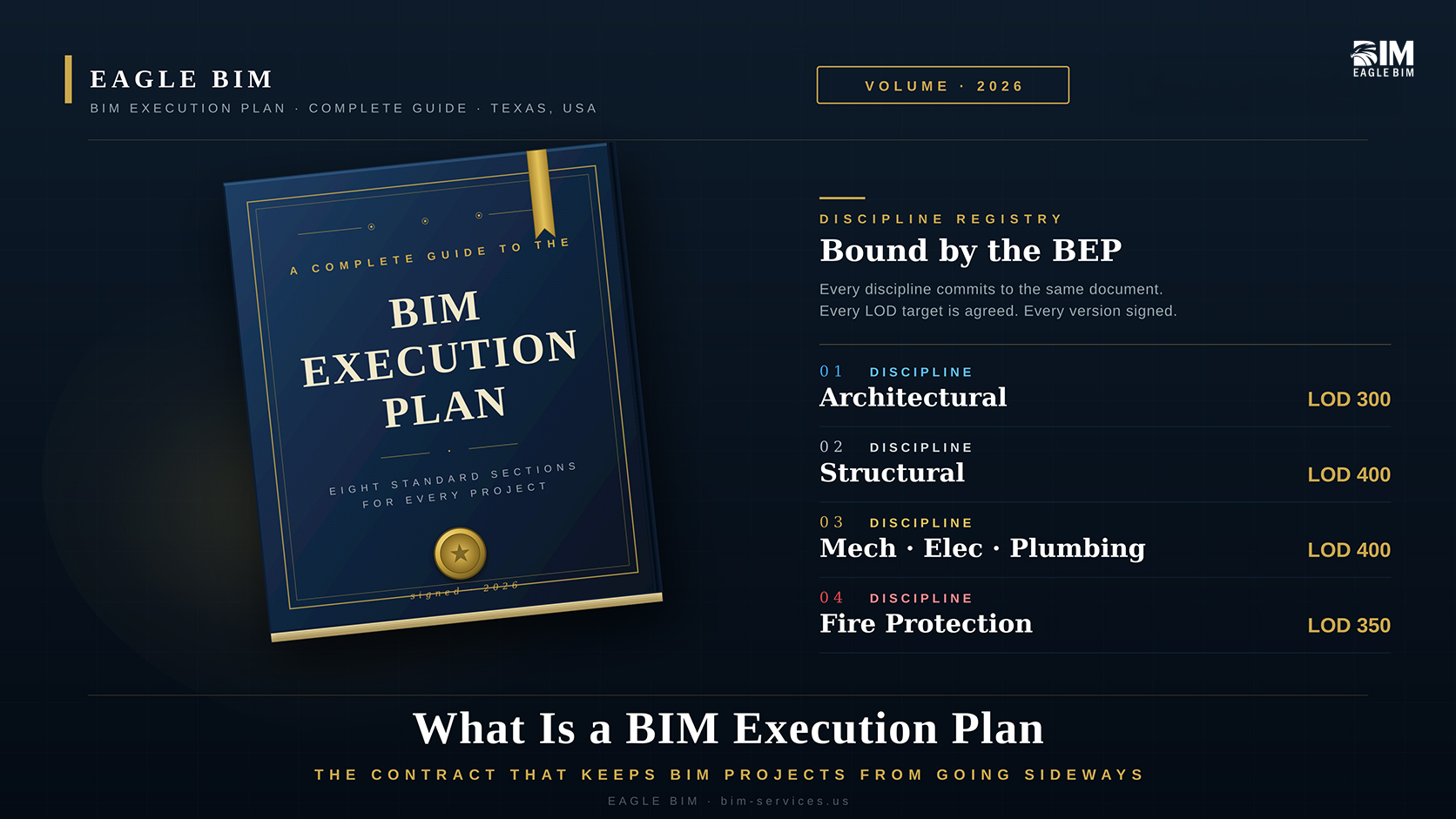
A BIM Execution Plan (BEP) is a written document that defines how Building Information Modeling will be delivered on a specific construction project. It is signed by every party that will produce or consume the model (the owner, architect, engineers, contractor, and trade subcontractors) and it locks down the eight things that, when not agreed up front, cause BIM projects to fail. Those things are: the project information and goals, the roles and responsibilities, the BIM uses, the software and version standards, the model structure and federation strategy, the level of development per element per phase, the coordination cadence, and the deliverables. The BEP is to a BIM project what a contract is to a construction project. Without one, there is no agreement on what is being built or by whom.
This guide explains what a BIM execution plan is in 2026, the eight standard sections that belong in every BEP, when in the project lifecycle the BEP gets written and updated, how to actually build a BEP from a blank page, the difference between a BEP and a BIM Standard, and the most common BIM execution plan mistakes that derail projects. Written for general contractors, MEP subcontractors, architects, engineers, BIM managers, and owner’s representatives who are responsible for authoring, reviewing, or signing off on a BEP.
What Is a BIM Execution Plan?
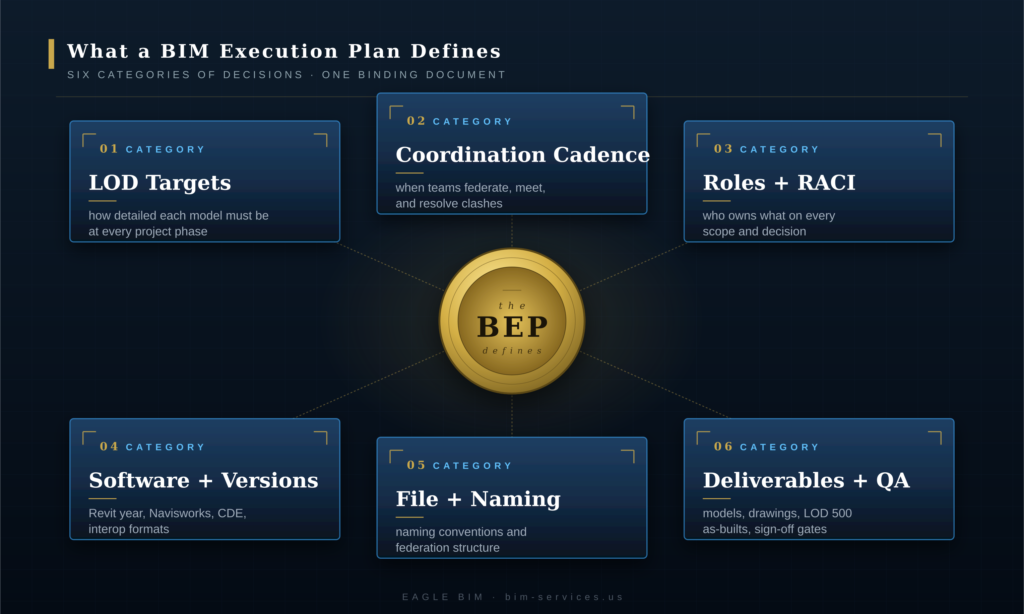
A BIM Execution Plan is a project-specific document that defines how every party on a construction project will create, share, and use the BIM model. It is authored by the project team in the first weeks of the engagement, signed by the owner and every contracted designer or constructor, and updated at each major phase gate. The BEP names the BIM Manager, lists the software and versions every discipline will use, sets the LOD target for every element type at every project phase, defines the federation strategy and naming conventions, schedules the coordination meetings, and specifies the deliverables and handoff format. It is the operating manual for the BIM scope of work.
The core function of a BIM execution plan is to eliminate ambiguity. Modern construction projects involve many parties producing and consuming BIM models in parallel. The architect models the building envelope. The structural engineer models the frame. Each MEP trade models its systems. The general contractor federates everything and runs coordination. The fabricators consume the model to build shop drawings and prefab assemblies. The owner’s facilities team eventually receives the as-built model for operations. If those parties have not agreed in advance on what level of detail to model at, what software to use, how files will be named, when coordination meetings happen, and who signs off on what, the project drifts into chaos by mid-design. The BEP document exists to prevent that drift.
A strong BIM execution plan is concrete and project-specific. Generic BEPs copied from a template and lightly customized cause as many problems as they solve, because they make commitments the team has not actually thought through. A good BEP is the result of two to four weeks of focused work in which the BIM Manager walks through every section with every discipline lead, gets explicit agreement on the LOD targets and meeting cadence, and writes down the answers in plain English. The what is BEP in BIM question is best answered not by a definition but by reading a real signed BEP from a project that succeeded.
The Penn State CIC BIM Project Execution Planning Guide established the modern format for BEPs in the early 2010s, and its framework still underpins how most BEPs are written today. The American Institute of Architects formalized the contractual standing of BEPs through documents like AIA E203-2013 (BIM and Digital Data Exhibit) and E201-2022 (Project Digital Data Protocol), which give the BEP legal weight as part of the project contract. We covered the AIA framework in detail in our BIM level of development guide, which walks through the LOD framework that every BIM execution plan relies on for its element-by-element commitments.
Why the BEP Matters More Than Any Other BIM Document
The BEP matters because it is the only document on a BIM project that binds every party to the same expectations. The BIM Standard says how the BIM team works internally. The clash detection report says what conflicts exist this week. The shop drawing says what the fabricator will build. Only the BEP defines what every party owes every other party for the duration of the project: which LOD by which date, which software at which version, which coordination meeting on which day. Without the BEP, every BIM disagreement becomes an unresolved argument because nobody can point to where the agreement was made. With a strong BEP, disagreements get resolved by reference to a signed document.
The financial consequence of a weak BIM execution plan is substantial. Projects without a clear BEP routinely lose weeks or months to disputes about scope: whether MEP coordination was supposed to reach LOD 400 or LOD 350, whether the architect was supposed to model penetrations or the structural engineer was, whether the BIM Manager has authority to require resubmittal of non-compliant models. Each of those disputes generates RFIs, change orders, and schedule slip. A two-week investment in a strong BEP routinely saves months of disputes downstream.
The BEP document also matters because it is the artifact that surfaces disagreements early. When the BIM Manager walks through the BEP draft with each discipline lead, the conversations expose mismatched assumptions that would otherwise stay buried until they hit the field. The architect thought structural would model openings; structural thought architect would. The mechanical contractor planned on LOD 400 fabrication-ready geometry; the BIM scope was only funded for LOD 350. Every one of those mismatches is cheap to fix during BEP authoring and expensive to fix in week 20. The BEP authoring process is itself the value, separate from the document it produces.
On contracted commercial work, a BIM execution plan now sits alongside the construction contract as one of the foundational project documents. Owners increasingly require a BEP as a precondition for project award, particularly on public, healthcare, and federal work. Practical guidance from organizations like the National BIM Standard (NBIMS-US) continues to position the BEP as the single most important document in the BIM project workflow, more important even than the model itself, because the BEP is what makes the model usable by every party on the project.
What Goes Inside a BIM Execution Plan
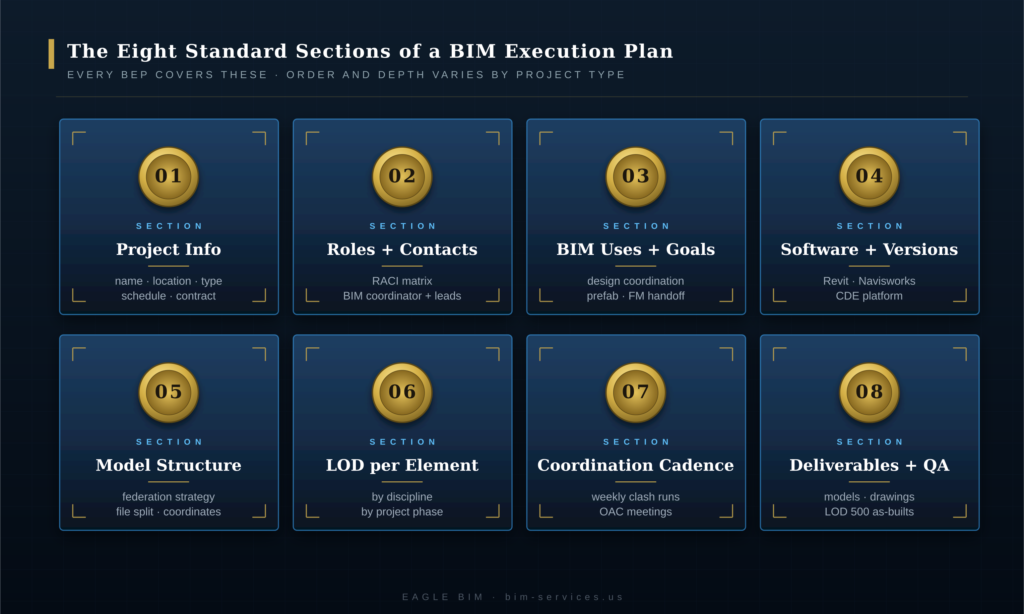
A standard BIM Execution Plan contains eight sections. Project information and goals (the project name, location, sectors, owner, timeline, and contract type). Roles and responsibilities (who the BIM Manager is, who the discipline leads are, who has sign-off authority, and how the RACI is structured). BIM uses and goals (which of the standard BIM uses the project will pursue: design review, coordination, prefab, COBie, asset management). Software and versions (every authoring and coordination tool with its locked version). Model structure (federation strategy, file organization, shared coordinates, splits between disciplines). Level of development per element (the LOD target for every category of element at every phase). Coordination cadence (the weekly clash detection and OAC meeting schedule). Deliverables and quality assurance (shop drawings, COBie, LOD 500 handoff, QA checkpoints). Every BEP that omits one of these sections leaves gaps that turn into disputes downstream.
Section 1: Project Information
The project section opens the BEP with the basics. Project name, address, sector classification, owner name, expected completion date, contract type (CMAR, design-build, design-bid-build, IPD, etc.), and any sector-specific regulatory framework that applies (FGI for healthcare, FedRAMP for federal data, etc.). This section anchors the BEP to a specific project rather than a generic template. A BIM execution plan that does not name the project on the first page is not a real BEP.
Section 2: Roles and Contacts
The roles section names the BIM Manager (a single person with sign-off authority on all BIM matters), each discipline lead (the senior modeler responsible for each authoring discipline), and the escalation chain. A RACI matrix shows who is responsible, accountable, consulted, and informed for every major BIM activity. This section is where disputes about who owes what to whom get resolved by reference, not by argument. If the BEP document does not have a clear BIM Manager named, no one is actually in charge.
Section 3: BIM Uses and Goals
The BIM uses section lists which of the standard BIM uses the project will pursue. The Penn State CIC framework defines twenty-five BIM uses across the project lifecycle, but most projects pursue a focused subset: design review, design authoring, 3D coordination, clash detection, sustainability analysis, code validation, drawing generation, COBie data, and 3D control and planning are the most common. Each BIM use the project pursues should have an owner, a deliverable, and a deadline. A BIM project plan that lists ten BIM uses without owners or deadlines is a wish list, not a plan.
Section 4: Software and Versions
The software section locks down every tool every discipline will use. Authoring software (typically Revit for AECO, Tekla for structural steel detailing, plus discipline-specific tools like CADmep for mechanical and SprinkCAD for fire protection). Federation and clash detection (Navisworks Manage, Revizto, or both). Common data environment (Autodesk Construction Cloud, BIM 360, Procore, BIMcollab, or others). Drawing markup (Bluebeam Revu). Version numbers are explicit and locked: “Revit 2026.1” not “Revit 2026.” Mismatched versions across disciplines cause file corruption and round-trip data loss, and the BEP exists to prevent that.
Section 5: Model Structure
The model structure section defines how the federated model is organized. Federation strategy (one master federated model, or multiple federated models by zone). Shared coordinates (which discipline owns the project base point and survey point). File organization (where models live, who has write access, who reads). Naming conventions (file naming, view naming, sheet naming, parameter naming). Splits between disciplines (whether architectural and interior architecture are separate models, whether MEP is one model or three, whether structural is concrete and steel together or separate). This is the section where teams that have not built BEPs before tend to leave the most gaps.
Section 6: Level of Development Per Element
The LOD section commits the team to specific Level of Development targets for every element category at every project phase. The framework is defined by AIA E201-2022 and elaborated by the BIMForum LOD Specification. A BEP LOD matrix typically lists every element category (walls, doors, windows, columns, beams, ducts, pipes, light fixtures, sprinklers, etc.) down the left side and project phases (schematic design, design development, construction documents, construction, handoff) across the top, with an LOD target (100, 200, 300, 350, 400, 500) in each cell. The matrix is the single most useful page in any BIM execution plan because it converts vague “we’ll coordinate to LOD 400” claims into specific element-by-element commitments.
Section 7: Coordination Cadence
The coordination section schedules the recurring activities that drive the BIM workflow. The weekly clash detection cycle (federate Monday, run tests Tuesday, OAC meeting Wednesday, trade updates Friday). The model publication schedule (when each discipline publishes updated models to the federated set). The phase-gate sign-offs (when LOD upgrades happen). The escalation process for unresolved clashes. The BIM execution plan should specify the day of the week, the time, the attendees, and the deliverable for every recurring meeting. We described the weekly cycle in detail in our Revit MEP coordination workflow guide.
Section 8: Deliverables and Quality Assurance
The deliverables section closes the BEP with what the team owes the owner at handoff. The LOD 500 as-built model (or a specified lower LOD if LOD 500 is not contracted). The COBie data export for facilities management. The shop drawings package. The model archive in IFC and native formats. The QA checkpoints (when models get audited against the BEP standards). The acceptance criteria for each deliverable. Without a clear deliverables section, projects reach the end with disputes about what the BIM scope was actually supposed to produce.
| Need Help Authoring a Strong BEP?
Eagle BIM authors and reviews BIM execution plans for owners, GCs, and trade contractors across Texas and the USA. Two to four week engagements that turn a blank template into a project-specific, signed, enforceable BEP. Healthcare, multifamily, data center, fab, and commercial sectors. |
When Do You Write a BIM Execution Plan?
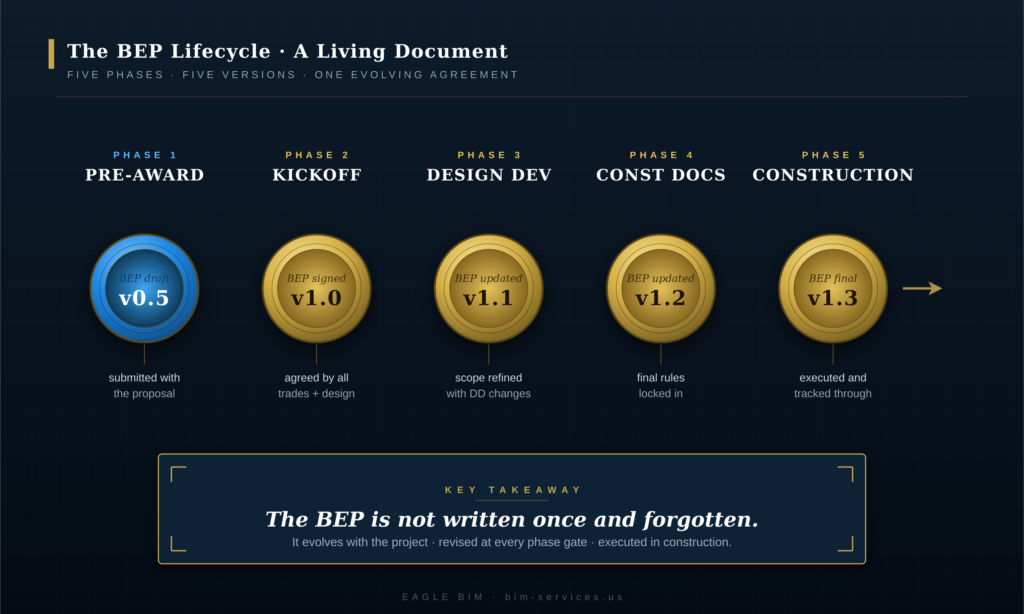
The BEP starts as an owner-side draft included in the project RFP, gets baselined at project kickoff after award, and updates at every major phase gate until the final as-built handoff. The first version (often called v0.1 or the pre-award draft) sets the owner’s expectations and asks bidders to commit to them. The baseline version (v1.0) is signed at kickoff after every contracted party has reviewed and agreed. The Design Development update (v1.1) adjusts LOD commitments and onboards any new disciplines that joined after kickoff. The Construction Documents update (v1.2) adds shop drawing scope and prefab handoff details. The final version (v2.0) closes out at as-built handoff with the LOD 500 model and COBie data. A BEP that gets signed at kickoff and never updated is not being used.
The pre-award stage is where many owners now include a draft BIM execution plan as part of the RFP package. The draft commits the owner to LOD targets, software standards, and coordination expectations, and asks bidders to commit to delivering against them. Sophisticated owners use this stage to filter out contractors who do not have the BIM capability to meet the standard. Less sophisticated owners skip this step and pay for it later in scope disputes.
The kickoff stage is the most important BEP milestone on every project. Within the first two to four weeks after award, the BIM Manager convenes a working session with every discipline lead and walks through every section of the BEP draft. Disagreements get resolved in the room. Commitments get written down. The final v1.0 BEP gets signed by every contracted party and distributed. After kickoff, the BEP is the authoritative reference for every BIM scope question. Projects that skip a real kickoff and just “adopt” a template BEP are projects that will fight BIM scope disputes for the rest of the engagement.
The Design Development update is the first revision cycle. By the time the project reaches DD, the team has learned things about the project that the kickoff BEP did not anticipate. New disciplines may have joined (specialty consultants, low-voltage, AV, security). LOD commitments may need adjustment as the design firms up. The v1.1 BEP captures those changes. The Construction Documents update (v1.2) is the second revision cycle and typically focuses on shop drawing scope, prefab handoff, and the construction-phase coordination cadence.
The as-built handoff is the final BEP milestone. The v2.0 BEP describes what was actually delivered: the final LOD 500 model, the COBie data set, the archived federated model in IFC and native formats, and the QA sign-off from the BIM Manager. Some projects skip the v2.0 close-out and treat the BEP as a working document that quietly ends when the project closes. That is a missed opportunity: the v2.0 BEP is the artifact the owner’s facilities team needs to understand and use the model they have just received.
How Do You Build a BIM Execution Plan?
Building a BEP from scratch takes two to four weeks of focused work and follows five steps. First, gather the inputs (the contract, the project scope, the owner’s BIM standards if any, every discipline lead’s contact information, the project schedule). Second, draft each section in sequence, starting with project information and ending with deliverables. Third, run a working session with every discipline lead in the room to walk through the draft and resolve disagreements. Fourth, revise the draft based on the session, circulate for written sign-off, and collect signatures. Fifth, publish the signed BEP to the common data environment where every party can access it. The five steps look simple on paper. The value comes from doing them with discipline rather than rushing them.
Step One: Gather the Inputs
Before drafting any section of the BIM execution plan, the BIM Manager collects every input the BEP will reference. The signed construction contract and any BIM exhibits (AIA E201-2022, AIA E203-2013, or owner-specific documents). The project scope, schedule, and budget. The owner’s published BIM standards, if any. The list of every contracted party and the name of each discipline lead. The list of every required deliverable. The locked software versions for every authoring tool. Skipping the input-gathering step is how teams produce BEPs that contradict the actual contract.
Step Two: Draft Each Section in Sequence
The draft proceeds through the eight standard sections in order. Project information first, because it anchors everything else. Roles and responsibilities next, because the people in those roles will be reviewing the rest of the draft. BIM uses third, because the use list drives the software and LOD decisions that follow. Software and versions fourth. Model structure fifth. LOD per element sixth (the most time-consuming section to draft). Coordination cadence seventh. Deliverables eighth. Drafting in this sequence ensures that later sections build on earlier ones rather than contradicting them.
Step Three: Run the Working Session
Once the draft is complete, the BIM Manager convenes a working session with every discipline lead in person or on video. Two to three hours minimum, longer if the project is complex. The agenda walks through every section of the draft, with the BIM Manager reading the commitments aloud and asking each discipline lead to confirm or push back. Disagreements get resolved in the room, with the BIM Manager owning the final call. Notes get taken on what changed. This step is where a BIM project plan either becomes real or stays theoretical.
Step Four: Revise, Circulate, and Sign
After the working session, the BIM Manager incorporates the session’s decisions into a revised draft. The revised draft circulates by email to every discipline lead for written sign-off. Each lead signs and returns. The BIM Manager collects the signatures and assembles the final v1.0 BEP. This step is administrative but matters: a BIM execution plan without signatures is a draft, not a commitment, and it does not survive contact with disputes downstream.
Step Five: Publish to the Common Data Environment
The signed v1.0 BEP gets published to the project’s common data environment (ACC, BIM 360, Procore, or wherever the project stores controlled documents). Every party can access it. Future revisions (v1.1, v1.2, v2.0) get published to the same location with version control. The BEP is referenced by file path or URL in every BIM-related communication for the rest of the project. Without this final step, the BEP document sits in someone’s email and gets forgotten within a month.
BEP vs BIM Standard vs BIM Protocol
These three documents are related but distinct. A BIM Standard is an organization-wide document published by a firm or owner that describes how that organization does BIM in general, independent of any specific project. A BIM Protocol is the contractual document (typically AIA E203 or similar) that gives the BEP legal weight by incorporating it into the construction contract. A BIM Execution Plan is the project-specific document that applies the BIM Standard and the BIM Protocol to one specific project. The BIM Standard says how the firm works. The BIM Protocol says what is contractually required. The BEP says what this specific project will do. Strong projects have all three. Weak projects have only the BEP and treat it as if it were also the Standard, which causes drift.
A firm-level BIM standards document is what an architecture firm or contractor publishes once and reuses across many projects. It describes the firm’s modeling conventions, file naming standards, template library, family library, view template library, and quality control process. The BIM Standard answers questions like “how do we name our Revit families?” and “what is our standard sheet template?” Every project the firm runs inherits the BIM Standard as the default. The BIM execution plan for any specific project then customizes the firm’s defaults to fit the project’s contractual requirements.
The BIM Protocol (most commonly AIA E203-2013, BIM and Digital Data Exhibit) is the contractual document that gives the BEP legal weight. The protocol is attached to the construction contract as an exhibit, and it says something like “the project will follow the BIM Execution Plan, which the parties will jointly develop and execute, and that BEP becomes part of the contract documents.” Without the protocol, the BEP is just a project document; with the protocol, it has contractual standing and disputes can be enforced against it. AIA E201-2022 (Project Digital Data Protocol) is the newer version that supersedes parts of E203 for digital data exchange specifically.
The BIM execution plan is the project-specific instance of all of this. It inherits the firm’s BIM Standard, complies with the contractual BIM Protocol, and adds the project-specific commitments that neither of the other two documents can include. Teams that conflate these three documents (treating their generic firm BIM Standard as if it were a project BEP, for example) end up with documents that do not actually fit the project and that nobody really uses.
What Are Common BIM Execution Plan Mistakes?
Five mistakes show up on most failed BEPs. Copying a generic template without project-specific customization. Skipping the kickoff working session and signing the BEP without real discussion. Leaving the LOD matrix incomplete or vague (“LOD 400 where appropriate” instead of element-by-element commitments). Not updating the BEP at phase gates so the document becomes stale and ignored. Treating the BEP as a one-time deliverable that ends after kickoff rather than a living document that evolves with the project. Each mistake is preventable, and each one routinely costs weeks of dispute time on commercial projects.
The first mistake is the most common. A team downloads a generic BIM execution plan template, fills in the project name and a few owner-specific fields, and signs it without thinking through whether the rest of the template actually fits the project. The result is a BEP full of commitments the team has not really made, which means the commitments get ignored when the work starts. The fix is to treat the template as a starting prompt, not a finished document, and to spend the time on each section to make it project-specific.
The second mistake is skipping the working session. The BIM Manager drafts the BEP alone, emails it around for sign-off, and collects signatures. The discipline leads sign without really reading it because they trust the BIM Manager. The mismatched assumptions never surface until they hit the field. The fix is to insist on a two-to-three-hour working session before signature, even when everyone says they are too busy to attend.
The third mistake is the vague LOD matrix. The BEP document says “the project will reach LOD 400 for MEP coordination,” which sounds specific but is not. LOD 400 for which elements? At which phase? With or without hangers and supports? Without insulation? The fix is to require an element-by-element LOD matrix with explicit targets for every category at every phase, and to push back hard against vague aggregate commitments.
The fourth mistake is not updating the BEP. Phase gates pass, new disciplines join, software versions get upgraded, and the BEP stays at v1.0 because nobody is responsible for updating it. By month six the BEP is so stale that nobody references it. The fix is to assign the BIM Manager explicit ownership of BEP updates at every phase gate and to put the BEP update on the project schedule as a deliverable with a deadline.
The fifth mistake is treating the BEP as a one-time deliverable. The team signs v1.0 at kickoff, files it, and never touches it again. The BEP exists but does not function. The fix is the same as for mistake four: assign explicit ownership, schedule explicit updates, and treat the BEP as a living document that gets revised at every phase gate. Strong projects have BEPs that grow with the project; weak projects have BEPs that ossify at kickoff.
How Eagle BIM Authors BIM Execution Plans
Eagle BIM authors and reviews BEPs for owners, general contractors, and trade contractors across Texas and the USA. Our standard engagement runs two to four weeks and covers all eight standard sections with explicit element-by-element LOD commitments, a real kickoff working session, and a signed v1.0 BEP delivered to the project’s common data environment. We work with the project’s contracted parties to surface mismatched assumptions before they become disputes. We update the BEP at every phase gate. We deliver the v2.0 close-out BEP at as-built handoff with the LOD 500 model and COBie data. Our practice is built on the principle that a strong BEP is the cheapest insurance a BIM project can buy.
Our BIM execution plan engagement starts with a one-hour scoping call to understand the project (sector, scale, contracted parties, schedule, owner standards) and produce a fee proposal. After award, the engagement runs in five phases mirroring the five steps above: input gathering (week 1), draft authoring (weeks 1-2), working session (week 2 or 3), revision and signature (week 3), publication and handoff (end of week 3 or 4). For projects that are already underway with a weak or missing BEP, we also offer a BEP document audit and rebuild service that retrofits a real BEP onto a project that has already started.
Eagle BIM works across Texas (Houston, Dallas-Fort Worth, Austin, San Antonio) and the broader USA, in association with BIMPRO LLC out of Pflugerville. Our BIM consulting services cover BEP authoring, BIM Standard development, and full BIM coordination services. For owners and contractors who need a starting point, the Penn State BIM Project Execution Planning Guide remains the most widely cited reference for BIM project plan structure and content.
Frequently Asked Questions
What is a BIM Execution Plan in simple terms?
A BIM Execution Plan (BEP) is a written agreement between every party on a construction project about how Building Information Modeling will be delivered. It says who will model what, to what level of detail, in what software, on what schedule, and how it all gets handed over at the end. It is signed by the owner, architect, engineers, contractor, and trade subcontractors at project kickoff, and updated at each major project phase.
Who writes the BIM Execution Plan?
The BIM Manager on the project is the primary author, working with input from every discipline lead. On owner-driven projects, the owner may write the pre-award draft as part of the RFP. On contractor-led projects, the general contractor’s BIM Manager typically authors the v1.0 baseline after award. Every contracted party reviews and signs. External consultants like Eagle BIM are sometimes engaged to author or review the BEP for owners and contractors who do not have in-house BIM management capacity.
When should a BEP be written?
Ideally, an owner-side pre-award draft is included in the RFP. The baseline v1.0 BEP is written and signed in the first two to four weeks after project award, before significant modeling work begins. The BEP is then updated at each major phase gate: a v1.1 update at Design Development, a v1.2 update at Construction Documents, and a final v2.0 close-out at as-built handoff. Waiting until the project is mid-design to write the BEP is too late and leads to retroactive disputes.
What is the difference between a BIM Execution Plan and a BIM Standard?
A BIM Standard is an organization-wide document that a firm publishes once and reuses across all projects. It describes the firm’s modeling conventions, templates, and quality processes. A BIM Execution Plan is project-specific and applies the firm’s BIM Standard plus the contractual BIM Protocol to one specific project. The Standard is generic; the BEP is specific. Strong firms have both, with the BEP referencing the Standard where appropriate.
What is the difference between a BEP and a BIM Protocol?
A BIM Protocol (most commonly AIA E203-2013 or AIA E201-2022 for digital data) is the contractual document that gives the BEP legal weight by incorporating it into the construction contract. The Protocol is signed once at contract execution. The BEP is the project-specific document that the Protocol references, and it gets updated throughout the project. Without the Protocol, the BEP is a project document but not contractually binding. With the Protocol, BEP commitments are enforceable.
How long does it take to write a BIM Execution Plan?
A real BEP for a commercial project takes two to four weeks of focused work to author from scratch, including the kickoff working session and signature collection. Simple projects can be done in two weeks. Complex projects (large healthcare, data center, semiconductor fab) take four weeks or more. Generic template BEPs can be “completed” in a day, but they are not real BEPs and do not function as agreements between the parties.
Where can I download a BIM Execution Plan template?
The Penn State CIC BIM Project Execution Planning Guide includes a downloadable template that is widely used as a starting point. AIA E201-2022 and E203-2013 provide the contractual exhibit templates. NIBS National BIM Standard provides additional reference material. The challenge with all template downloads is that the template is just a starting prompt: turning a template into a real BEP requires the project-specific authoring work described in the body of this article. A template is not a substitute for the work.
Is a BIM Execution Plan required on every project?
A BEP is now required on most public-sector projects (federal, state, large municipal), most healthcare projects, and an increasing percentage of large commercial projects. Owners that require a BEP typically include it as part of the contract requirements. Even on projects where a BEP is not contractually required, sophisticated GCs author one anyway because the cost of authoring a BEP is far less than the cost of the disputes that arise without one.
| Need a Strong BEP for Your Next Project?
Send Eagle BIM your project scope and we will come back with a BIM execution plan engagement proposal. Two to four weeks from kickoff to signed v1.0, with element-by-element LOD commitments and a real working session. Texas and USA coverage across every major commercial sector. |