
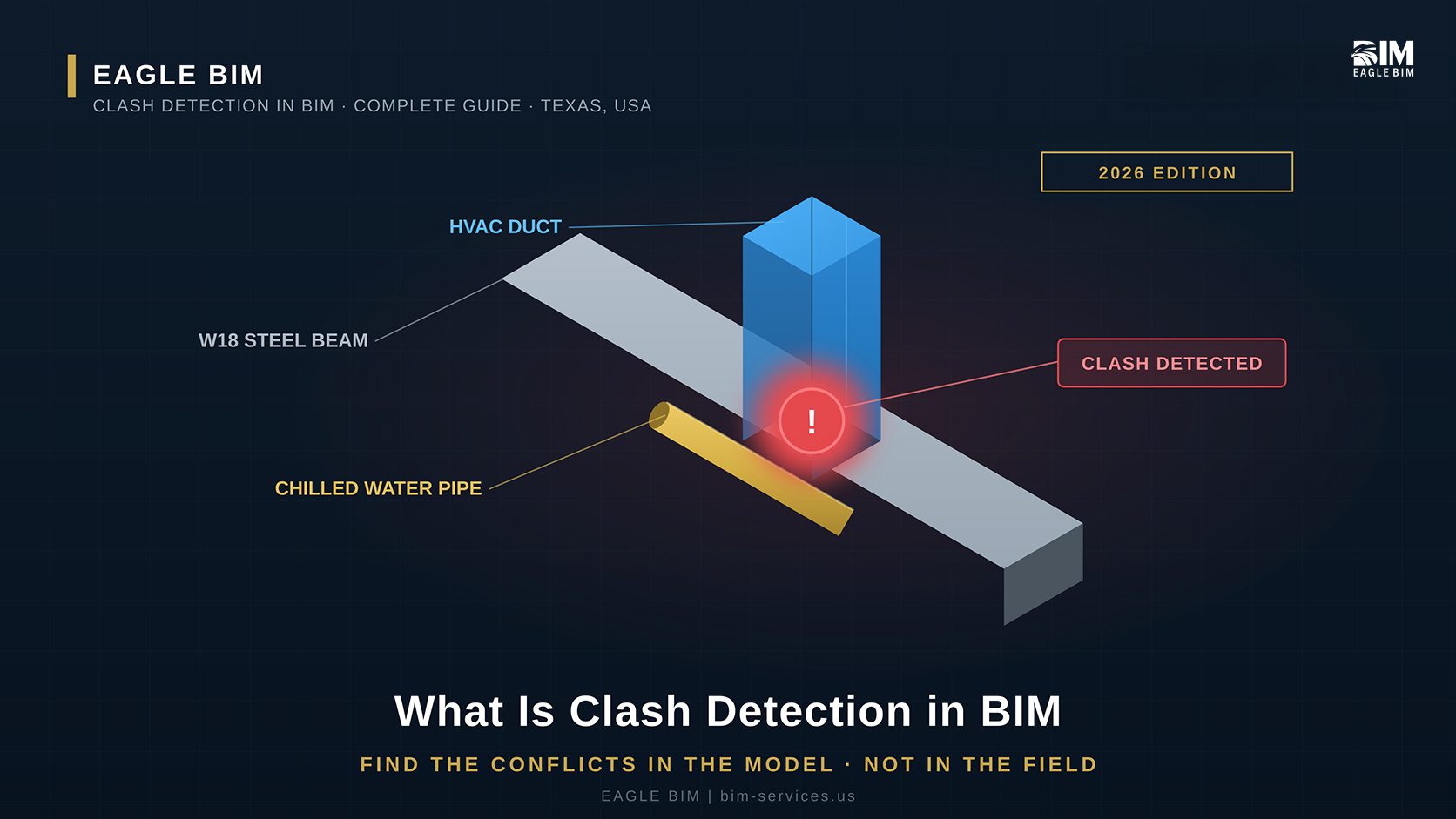
Clash detection is the automated process of finding where building systems geometrically conflict with each other in a federated BIM model before construction begins. Software such as Autodesk Navisworks or Revizto runs rule-based tests between the linked discipline models (architectural, structural, mechanical, electrical, plumbing, fire protection) and flags every place where two objects occupy the same space (a hard clash), where an object violates the required clearance around another (a soft clash), or where the construction sequence conflicts in time (a workflow or 4D clash). The output is a clash report that the project team resolves in coordination meetings, so conflicts get fixed in the model rather than discovered in the field.
This guide explains what clash detection actually does in 2026, the three types of clashes (hard, soft, workflow), how the clash detection process runs step by step, which software the industry uses, how clash tests are organized by discipline, how to avoid false positives, and how clash detection in BIM fits inside the larger coordination workflow. Written for general contractors, MEP subcontractors, architects, and BIM coordinators who need a practical understanding of how BIM clash detection works on real commercial projects.
What Is Clash Detection in BIM?
Clash detection is the process of using BIM software to automatically identify conflicts between building elements before they are built. Each design discipline models its own systems in 3D. Those models are combined into one federated model, and clash detection software compares every element against every other element to find collisions, clearance violations, and sequencing conflicts. Instead of a tradesperson discovering in the field that a duct runs through a beam, clash detection surfaces that conflict in the model weeks earlier, where the fix costs a model edit instead of field rework.
BIM clash detection exists because modern buildings are designed by many teams working in parallel. The architect models walls, floors, and the building envelope. The structural engineer models beams, columns, and slabs. The mechanical engineer models ductwork and piping. Electrical models cable tray and conduit. Plumbing models water and drainage. Fire protection models sprinklers. Each team works in its own model and its own software. None of them can see the others in real time. Without clash detection, the first time those systems meet is on the job site, and by then a conflict means tearing out installed work.
The financial logic is simple. A conflict caught in the model costs a few minutes of a coordinator’s time to flag and a designer’s time to reroute. The same conflict caught in the field costs demolition, re-fabrication, re-installation, an RFI cycle, schedule delay, and often a change order. Industry research has long shown that clash detection in BIM reduces field rework and RFIs substantially on complex commercial projects, which is why it is now a baseline requirement in most BIM Execution Plans rather than an optional extra.
Clash detection is not the same thing as coordination, though the two are closely linked. Clash detection is the automated test that finds the conflicts. Coordination is the broader human process of resolving them: the meetings, the assignments, the rerouting decisions, the re-modeling. We covered the full coordination scope in our
What Is BIM Coordination guide. This article focuses specifically on the clash detection step: what it finds, how it runs, and how to do it well.
The Three Types of Clashes
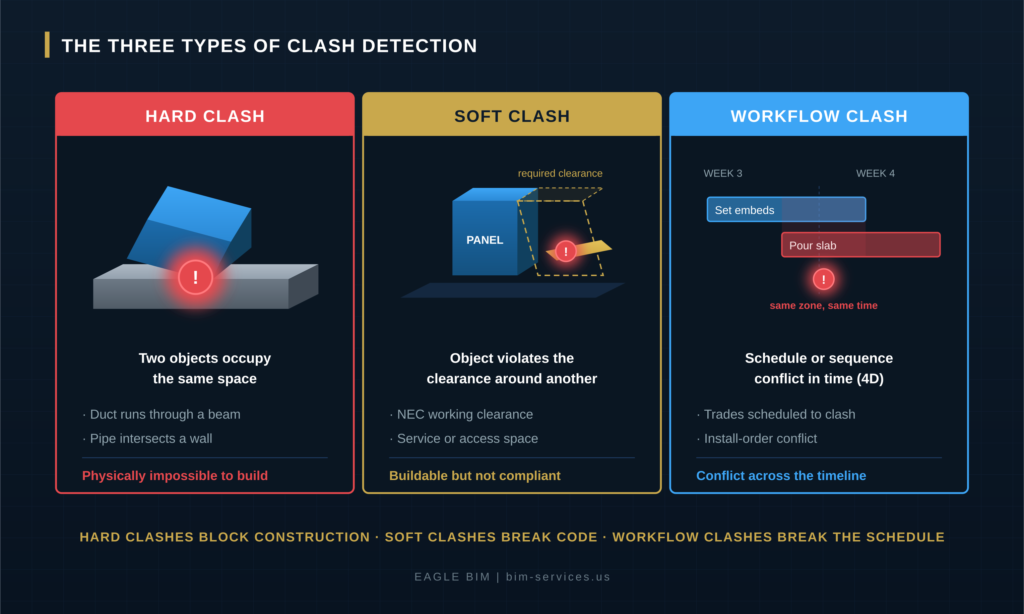
There are three types of clashes in BIM. A hard clash is when two objects physically occupy the same space, such as a duct running through a structural beam. A soft clash (also called a clearance clash) is when an object intrudes into the clearance or access space another object requires, such as equipment placed too close to an electrical panel to meet NEC working clearance. A workflow clash (also called a 4D clash) is a conflict in time or sequence, such as two trades scheduled to install in the same location during the same week, or work sequenced so that one trade blocks another. Hard clashes block construction, soft clashes break code or maintainability, and workflow clashes break the schedule.
Hard Clashes
A hard clash is the most obvious type and the easiest to detect. Two solid objects overlap in 3D space. A supply duct passes through a steel beam. A sprinkler main runs through a column. A plumbing riser intersects a floor slab where there is no sleeve. These conflicts are physically impossible to build, so they must be resolved before fabrication. Clash detection software finds hard clashes by testing for geometric intersection between every pair of elements in the federated model. Hard clashes make up the bulk of the clash report on most projects, especially in early coordination cycles.
Soft Clashes and Clearance Violations
A soft clash is subtler and often more important. The objects do not physically overlap, but one intrudes into a space the other needs. Every piece of equipment has clearance requirements: an electrical panel needs working clearance per NEC 110.26, an air handler needs service and filter-pull access, a valve needs room for a technician to operate it. When another object encroaches on that clearance, the result is buildable but not compliant or not maintainable. Soft clash detection requires setting a clearance tolerance in the clash detection software so the test flags intrusions into the buffer zone around an element, not just direct collisions.
Workflow and 4D Clashes
A workflow clash is a conflict in the time dimension rather than space. When the BIM model is linked to the construction schedule (4D BIM), clash detection can find sequencing conflicts: two trades scheduled to work in the same zone at the same time, materials staged where later work needs access, or an install order where one system has to go in before another that is scheduled first. Workflow clashes are less common in standard BIM clash detection practice because they require 4D scheduling integration, but on large and schedule-critical projects (data centers, hospitals, fabs) they prevent expensive sequencing mistakes.
How Does the Clash Detection Process Work?
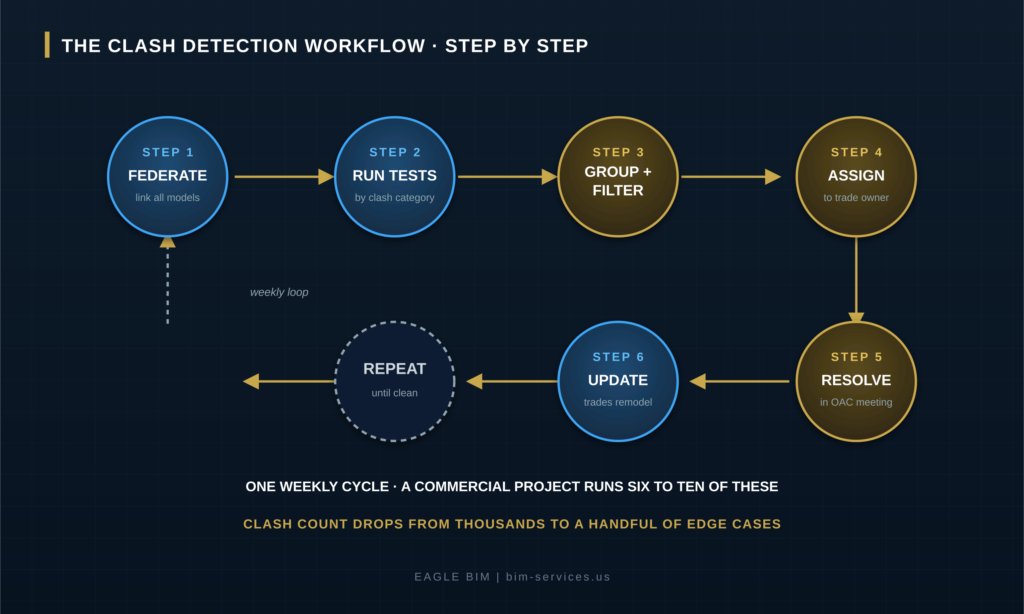
The clash detection process runs in a structured cycle. First, the coordination team federates the latest discipline models into one combined model using shared coordinates. Second, they run clash detection tests organized by category (mechanical vs structural, plumbing vs electrical, and so on). Third, they group and filter the raw results to remove duplicates and false positives. Fourth, they assign each real clash to the responsible trade. Fifth, the trades resolve the clashes in a coordination meeting and update their models. The cycle then repeats. A typical commercial project runs six to ten of these weekly cycles, with the clash count dropping from thousands in the first run to a handful of edge cases by the end.
Step One: Federate the Models
The clash detection process starts with federation. The coordination team links every discipline model into one combined model using shared coordinates so that everything lines up in the same 3D space. If the models do not share a common origin and orientation, the clash detection run produces nonsense: thousands of phantom clashes caused by misaligned models rather than real conflicts. Getting shared coordinates right is the single most important setup step, and it is where inexperienced teams most often go wrong.
Step Two: Run the Clash Tests
With the federated model assembled, the team runs the clash tests. Tests are organized by discipline pair (the clash matrix), not as one giant test of everything against everything. A well-structured test set might include mechanical vs structural, mechanical vs plumbing, plumbing vs electrical, fire protection vs mechanical, and so on. Running organized tests makes the results far easier to triage than a single undifferentiated clash list. Navisworks clash detection calls these Clash Detective tests, and each one can carry its own tolerance, rule set, and assigned reviewer.
Step Three: Group and Filter
The raw output of a clash detection run is almost never the real picture. A single misrouted duct can generate dozens of individual clash hits as it passes through multiple elements. Insulation can register as a clash when it is not a real conflict. The same conflict can appear on multiple floors of a repeating layout. Grouping and filtering collapses these into meaningful issues: one decision per real conflict, with duplicates and known false positives removed. This step separates good BIM clash detection from a meaningless flood of red dots.
Step Four: Assign to the Responsible Trade
Each real clash gets assigned to whichever trade owns the fix. When a duct clashes with a sprinkler main, someone has to decide which one moves. That decision usually follows a priority hierarchy established in the BIM Execution Plan: gravity systems (drainage) before pressure systems, large ducts before small pipes, structural before everything. The assignment carries an owner and a deadline so it can be tracked to resolution.
Step Five: Resolve, Update, and Repeat
The assigned trades take their clashes back, reroute their systems, and republish updated models. The coordination team re-federates, re-runs the clash detection tests, and checks that resolved clashes are actually gone and that the fixes did not create new conflicts. The cycle repeats weekly. The clash count drops steadily: thousands in week one, hundreds by week four, dozens by week six, a handful of edge cases by week eight. We described how this cycle fits the broader weekly coordination rhythm in our
Revit MEP coordination workflow guide, which walks through the eight-week cadence end to end.
| Need Clash Detection on Your Next Project?
Eagle BIM runs disciplined clash detection across Texas and the USA. Federated model setup, organized clash tests, grouped and filtered reports, and weekly resolution cycles. Healthcare, multifamily, data center, fab, and commercial sectors. |
What Software Is Used for Clash Detection?
The dominant clash detection software is Autodesk Navisworks Manage, which federates models from any source and runs rule-based clash tests through its Clash Detective tool. Revizto has grown rapidly as a cloud-based alternative that combines federation, clash detection, and issue tracking in one platform. Solibri Office is used where rule-based model checking and code compliance matter alongside clash detection. Authoring tools like Autodesk Revit also include built-in interference checking for in-model spot checks. Most US commercial projects standardize on Navisworks or Revizto for formal clash detection, with the common data environment (Autodesk Construction Cloud or Procore) hosting the models and issue logs.
Navisworks clash detection is the long-standing industry standard. Navisworks aggregates models from Revit, Tekla, CAD, IFC, and fire-protection tools into a single NWD or NWF file, then runs Clash Detective tests with configurable rules, tolerances, and selection sets. It exports clash reports in HTML, XML, and viewpoint formats that drive the coordination meeting. Its strength is that it accepts almost any model format and handles very large federated models without choking.
Revizto has become the fastest-growing clash detection software in commercial construction because it is cloud-native. Where Navisworks is a desktop tool, Revizto puts the federated model, the clash results, and the issue tracker in the cloud so the whole team works from the same live data. Trade reps can see their assigned clashes, navigate to them in 3D, and mark them resolved without a separate issue-tracking system. Many teams now run Revizto for the coordination and issue-tracking layer while still using Navisworks or authoring-tool checks for certain test types.
Solibri occupies a different niche. Rather than focusing only on geometric clash detection, Solibri specializes in rule-based model checking: validating that the model meets defined quality, code, and content rules. On projects where model quality assurance and code compliance matter as much as geometric coordination, Solibri runs alongside the clash detection tools. Revit’s own interference check is useful for a designer doing a quick in-model spot check, but it is not a substitute for federated BIM clash detection across all disciplines.
How Clash Tests Are Organized by Discipline
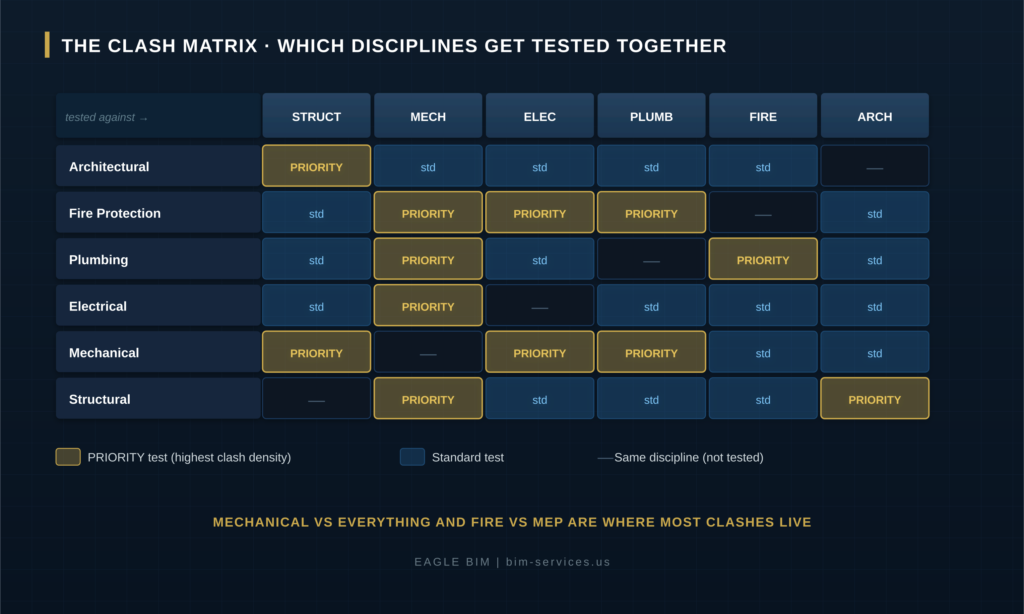
Clash detection tests are organized as a matrix of discipline pairs rather than one test of everything against everything. The structural model is tested against every MEP trade because beams and columns are fixed obstacles the MEP systems must route around. Mechanical is tested against everything because ductwork is the largest and least flexible MEP system. Fire protection is tested against mechanical, electrical, and plumbing because sprinkler mains compete for the same plenum space. This organized approach makes the clash report far easier to triage than a single undifferentiated list, because each test can be assigned to the right reviewer with the right tolerance.
The clash matrix concentrates the work where the conflicts actually live. Mechanical versus structural is almost always the highest-volume test because ductwork is large, runs everywhere, and has to weave around the structural frame. Mechanical versus plumbing and mechanical versus fire protection are close behind because all three compete for the ceiling plenum. Clash detection between the smaller systems (electrical conduit versus plumbing, for example) produces fewer hits because conduit is flexible and easy to reroute. Setting up the test matrix correctly is what makes the difference between a focused clash detection process and a chaotic one.
Same-discipline tests are usually omitted from the matrix because a discipline coordinates its own systems internally before publishing. Mechanical does not run clash detection of its own ductwork against its own piping in the federated coordination model, because that internal coordination happened in the authoring tool. The federated BIM clash detection run focuses on cross-discipline conflicts, which are the ones no single trade can see on their own. We covered how the MEP trades coordinate internally and against each other in our
How Do You Avoid False Positives in Clash Detection?
False positives are reduced by setting appropriate clash tolerances, grouping related clashes, excluding known non-issues, and modeling at a consistent level of development across disciplines. A clash tolerance tells the software to ignore overlaps smaller than a set distance, which filters out insignificant touches. Grouping collapses the many individual hits caused by one misrouted element into a single issue. Exclusion rules remove known non-conflicts such as insulation touching structure or elements that are allowed to coincide. Consistent level of development prevents mismatched detail from generating phantom clashes. Without these controls, a clash report becomes an unusable flood of false alarms that teams learn to ignore.
The biggest source of false positives in clash detection is inconsistent level of development across the discipline models. If mechanical is modeled at LOD 350 with full hangers and supports while plumbing is modeled at LOD 300 generic geometry, the clash detection run flags conflicts that are artifacts of the detail mismatch rather than real spatial problems. Enforcing a consistent LOD target across all trades through the BIM Execution Plan is the single most effective way to keep the clash report meaningful. We explained the LOD framework in detail in our
BIM level of development guide.
The second source of false positives is tolerance set too tight. If the clash detection software flags every overlap down to a fraction of an inch, the report fills with insignificant touches that are not real coordination issues. A sensible tolerance (commonly set so that only meaningful overlaps register) filters the noise. The third source is failing to group and exclude: a single duct passing through five joists generates five clashes that are really one routing decision, and insulation or fireproofing touching structure registers as a clash when it is expected. Disciplined grouping and exclusion rules turn a raw clash detection dump into an actionable issue list.
Clash Detection vs Coordination vs Clash Avoidance
Clash detection, coordination, and clash avoidance are three related but distinct ideas. Clash detection is the automated software step that finds conflicts in the federated model. Coordination is the broader human process that wraps around it: the meetings, assignments, rerouting decisions, and re-modeling that resolve the conflicts. Clash avoidance is the upstream discipline of modeling systems correctly in the first place so fewer clashes occur, through shared corridors, agreed routing zones, and good BIM Execution Plan rules. Mature teams treat clash detection as one tool inside coordination, and use clash avoidance to reduce the number of clashes the detection step has to catch.
The distinction matters because some teams treat clash detection as the whole job. They run the tests, export a report, and email it around, then wonder why the field still hits conflicts. Clash detection only finds problems. It does not resolve them. Resolution happens in coordination: the OAC meeting where trades agree who moves, the assignment tracking, the re-modeling, and the verification that the fix worked. A clash report with no coordination process behind it is just a list.
Clash avoidance is the mark of an experienced coordination team. Rather than modeling everything independently and then catching the thousands of resulting clashes, a good team sets routing zones and corridor priorities up front: ductwork gets the high plenum, plumbing gets a defined band, electrical and low-voltage get their pathways, and the fire protection main has its lane. With those rules agreed before modeling, the first clash detection run produces far fewer conflicts, and the ones that remain are genuine edge cases rather than avoidable collisions. Good clash detection in BIM practice is as much about preventing clashes as catching them.
How Eagle BIM Runs Clash Detection
Eagle BIM runs clash detection as part of a disciplined weekly coordination cycle. We federate the latest discipline models with verified shared coordinates, run an organized matrix of clash tests in Navisworks or Revizto, group and filter the results to remove duplicates and false positives, assign each real clash to the responsible trade through a priority hierarchy, and drive resolution in weekly OAC meetings. Our intake audit catches level of development mismatches in week one so the clash reports stay meaningful from the first run. We work in Autodesk Construction Cloud, BIM 360, Procore, Bluebeam, and Revizto depending on the project’s standard environment.
Our clash detection practice is built on the principle that a clash report is only as good as the model setup behind it. Before the first test runs, we verify shared coordinates across every discipline, confirm consistent level of development targets, and configure the test matrix and tolerances for the specific project. That setup discipline is why our clash detection process produces actionable reports rather than thousands of false positives that the trades learn to ignore.
Eagle BIM works across Texas (Houston, Dallas-Fort Worth, Austin, San Antonio) and the broader USA. Our clash detection services cover healthcare, multifamily, data center, semiconductor fab, and commercial sectors. We deliver BIM clash detection as a standalone service or as part of full BIM coordination services. Industry guidance from organizations like the National BIM Standard (NBIMS-US) continues to treat coordinated, clash-free models as the baseline expectation for modern project delivery.
Frequently Asked Questions
What is clash detection in simple terms?
Clash detection is using software to find where different building systems would crash into each other before they are built. Each trade designs its part in a 3D model. The models are combined, and the software automatically finds every place where, for example, a duct would run through a beam or a pipe would block access to an electrical panel. The conflicts get fixed in the model instead of on the job site.
What are the three types of clashes?
Hard clashes (two objects in the same physical space, like a duct through a beam), soft clashes (an object intruding on the clearance another object needs, like equipment too close to an electrical panel), and workflow clashes (a conflict in the construction schedule or sequence, also called 4D clashes). Hard clashes block construction, soft clashes break code or maintainability, and workflow clashes break the schedule.
What software is used for clash detection?
Autodesk Navisworks Manage is the long-standing industry standard for federation and clash detection. Revizto is a fast-growing cloud-based alternative that combines clash detection with issue tracking. Solibri is used for rule-based model checking and code compliance. Authoring tools like Revit include built-in interference checking for quick in-model spot checks. Most US commercial projects standardize on Navisworks or Revizto.
What is the difference between clash detection and BIM coordination?
Clash detection is the automated software step that finds conflicts in the federated model. BIM coordination is the entire workflow around it: setting up the federated model, running clash detection, holding coordination meetings, assigning and resolving conflicts, and verifying fixes. Clash detection finds the problems. Coordination resolves them. Clash detection is one tool inside the broader coordination process.
What is a soft clash?
A soft clash, also called a clearance clash, is when an object does not physically overlap another but intrudes into the clearance or access space the other object requires. For example, equipment placed too close to an electrical panel to meet NEC working clearance, or a pipe routed where a technician needs room to service a valve. The work is buildable but not compliant or not maintainable. Soft clash detection requires setting a clearance tolerance in the software.
How long does clash detection take?
Clash detection itself is an automated test that runs in minutes once the federated model is set up. The full clash detection and resolution cycle on a commercial project typically runs six to ten weekly cycles, with the clash count dropping from thousands in the first run to a handful by the end. The duration depends on project size, number of disciplines, and how clean the source models are at intake.
Why do clash reports have so many false positives?
The main causes are inconsistent level of development across the discipline models, clash tolerance set too tight, and failure to group and exclude. When one trade models in more detail than another, the mismatch generates phantom clashes. When tolerance is too tight, insignificant touches register as clashes. When related hits are not grouped, one misrouted element produces many duplicate clashes. Good practice controls all three so the report stays actionable.
Does clash detection save money?
Yes, when done properly. A conflict caught in the model costs a model edit. The same conflict caught in the field costs demolition, re-fabrication, re-installation, an RFI cycle, schedule delay, and often a change order. Disciplined clash detection moves conflict discovery from the most expensive phase (field installation) to the cheapest phase (the model), which is why it reduces field rework and RFIs substantially on complex commercial projects.
| Scoping a Project That Needs Clash Detection?
Send Eagle BIM your discipline models or project scope. We will come back with a clash detection proposal that covers federation, an organized test matrix, grouped and filtered reporting, and weekly resolution cycles. Texas and USA coverage across every major commercial sector. |