
The Coffee-Table Test: Why the Title Block Decides Trust
Imagine you drop a printed drawing on a coffee table in a busy site office in Texas. A reviewer walks by, glances down, and has maybe eight seconds to decide if they trust the title block enough to keep reviewing the sheet.
They are not judging your hatches. They are scanning for fast truth:
What is this?
Where does it live?
Which version is it?
Who is accountable?
If the title block answers those questions at a glance, the conversation moves forward. If it doesn’t, you’ve just bought yourself a round of emails—no matter how good the design is.
The Boarding-Pass Analogy: How a Title Block Works
Think of every sheet like a flight.
The drawing is the airplane.
The title block is the boarding pass.
-
Flight number → sheet number
-
Destination → zone / level / key plan
-
Departure time → date and status of issue
-
Passenger name → drawn by / checked by
-
Gate and terminal → project name and number
When a boarding pass is clear, people move.
When it’s smudged or missing, nobody boards.
The same is true for construction drawings across the USA.
What Reviewers Need to See in a Title Block (and Only This)
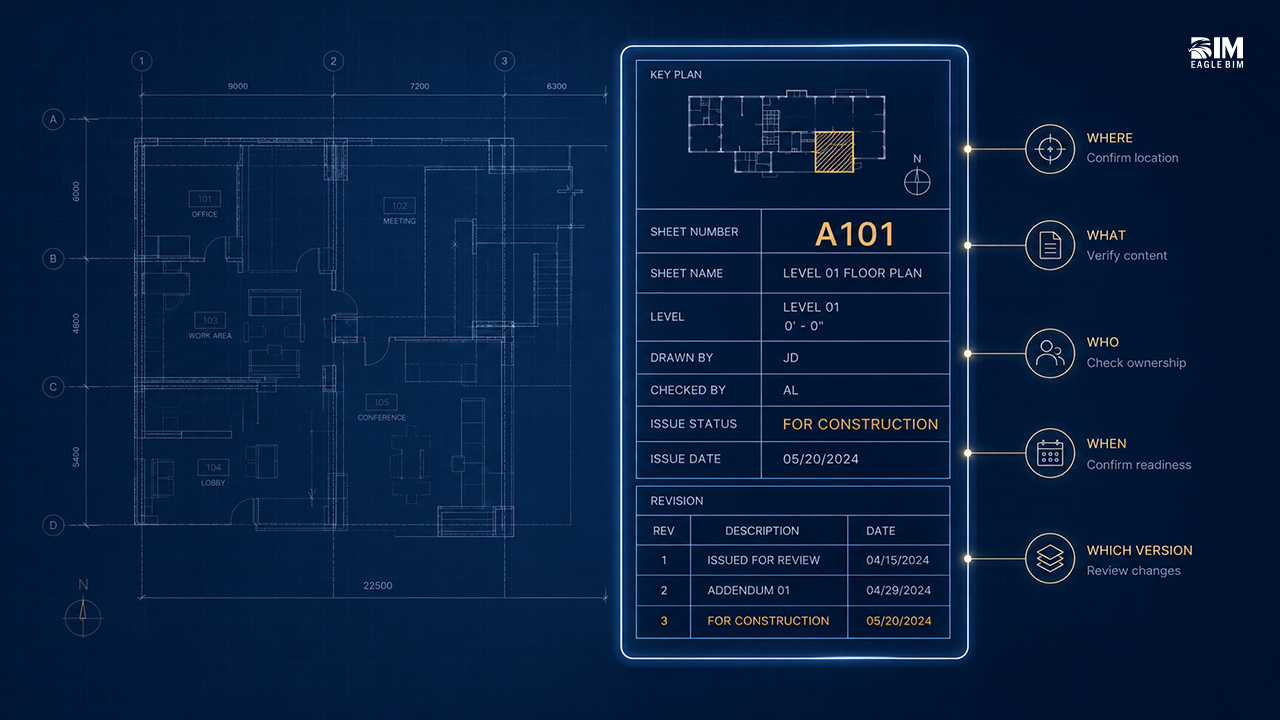
Keep it short, clean, and consistent. A good title block shows:
Who + What
Project name and number, plus a sheet name that reads like plain English.
“Level 3 – Reflected Ceiling Plan” beats “RCP v2 FINAL FINAL.”
Where
A small key plan with the correct area highlighted, plus the level.
Reviewers should never guess where the view lives.
When
One clear status—For Coordination, For Construction, or As-Built—paired with a readable date.
Which Version
Today’s revision only. One code, one short description, one date.
If older revision clouds are still visible, trust drops immediately.
Who’s Responsible
Drawn By and Checked By initials.
This is not about blame. It’s about confidence.
That’s it.
If any of these are fuzzy, everything else slows down.
Small Title Block Choices That Make a Big Difference
-
Big and small text: Use two sizes only. Sheet number and name read first; everything else supports.
-
White space signals control: A crowded title block feels like a crowded project.
-
Dates that read fast: YYYY-MM-DD avoids confusion across teams and regions.
-
One truth per sheet: One status. One revision. One owner.
These tiny decisions matter more than graphic style.
A Real Story from a Texas Project Week
Two teams issued the same plan.
One title block said “CD.”
The file name said “IFC.”
The revision history told a third story.
That sheet bounced for three days and picked up multiple RFIs.
The other team’s sheet was boring—in the best way.
The key plan lit the correct zone.
The status matched the file name.
One revision note told the full story.
Same design quality.
Very different outcomes.
A Title Block Checklist You Can Pin Above Your Desk
Before issuing, check these in 30 seconds:
-
Project name and number shown
-
Sheet number and plain-English sheet name
-
Level and key plan with correct zone highlighted
-
Clear status of issue
-
One current revision with description and date
-
Drawn By and Checked By initials
-
File name matches what the title block says
If you can tick these quickly, a reviewer in Texas or anywhere in the USA can too.
Keep the Ripple Clean from Review to Construction
A clear title block does more than help today’s review.
It protects tomorrow’s work.
Clean status and revisions keep shop drawings aligned and prevent the “Which version are we building?” spiral. When we set up projects for clients across Texas and the USA, we bake these rules directly into Revit drafting templates so every new sheet inherits the same clarity.
If you want us to tune your current title block and run a quick before/after using one of your live sheets, share a sample through our Revit Drafting Services page. We’ll reshape the boarding pass so your drawings move through review without friction.
Frequently Asked Questions
Q1. Why is the title block so important on a construction drawing?
The title block is the boarding pass for every sheet — it tells a reviewer in seconds what the drawing is, where it lives, which version it is, and who is accountable. Reviewers in Texas and across the USA glance at the title block before they read any drawing content. If it answers those four questions clearly, the review moves forward. If it doesn’t, you’ve already triggered RFIs and review delays regardless of how good the design is.
Q2. What information must a construction title block include?
A clean title block shows five things: project name and number plus a plain-English sheet name, level and a small key plan with the active zone highlighted, one clear status of issue (For Coordination / For Construction / As-Built) with a readable date, today’s current revision only with description and date, and Drawn By and Checked By initials. Anything beyond these five items is decoration that dilutes the signal reviewers need.
Q3. What are the most common title block mistakes that slow down reviews?
Three mistakes dominate: mixed signals (one status on the title block, another in the file name, a third in the revision history), too much information packed into a crowded title block, and stale revision clouds left visible from older issues. Reviewers see one of these inconsistencies and trust drops immediately — they start questioning the whole sheet, not just the title block, which lengthens reviews and adds avoidable RFIs.
Q4. Should the file name match the title block exactly?
Yes — and this is one of the most overlooked title block details. If the title block says ‘CD’ and the file name says ‘IFC,’ the drawing has just contradicted itself before anyone reads the design. The fix is a strict naming convention like project-discipline-sheetnumber-sheetname-rev-status.pdf, and a rule that the sheet face must always match the file name. This single discipline eliminates a whole category of sheet review confusion.
Q5. What date format should be used in a title block?
Use YYYY-MM-DD format for all dates in the title block. It reads unambiguously across teams in Texas, the USA, and any international consultants involved in the project — 2026-05-18 is the same date everywhere, whereas 05/18/2026 and 18/05/2026 mean different things to different reviewers. Consistent dates feel like a small detail but they protect against confusion that compounds across hundreds of sheets in a CD set.
Q6. How can I check my title block before issuing a drawing set?
Run a 30-second pre-issue checklist on every sheet: project name and number shown, sheet number and plain-English sheet name present, level and key plan with correct zone highlighted, clear status of issue, one current revision with description and date, Drawn By and Checked By initials filled, and file name matching the title block. If you can tick all seven quickly, a reviewer in Texas or anywhere in the USA can too — and your first-pass approval rate climbs.