LOD 100, 200, 300, 350, 400, 500 Explained — The Complete Guide for 2026
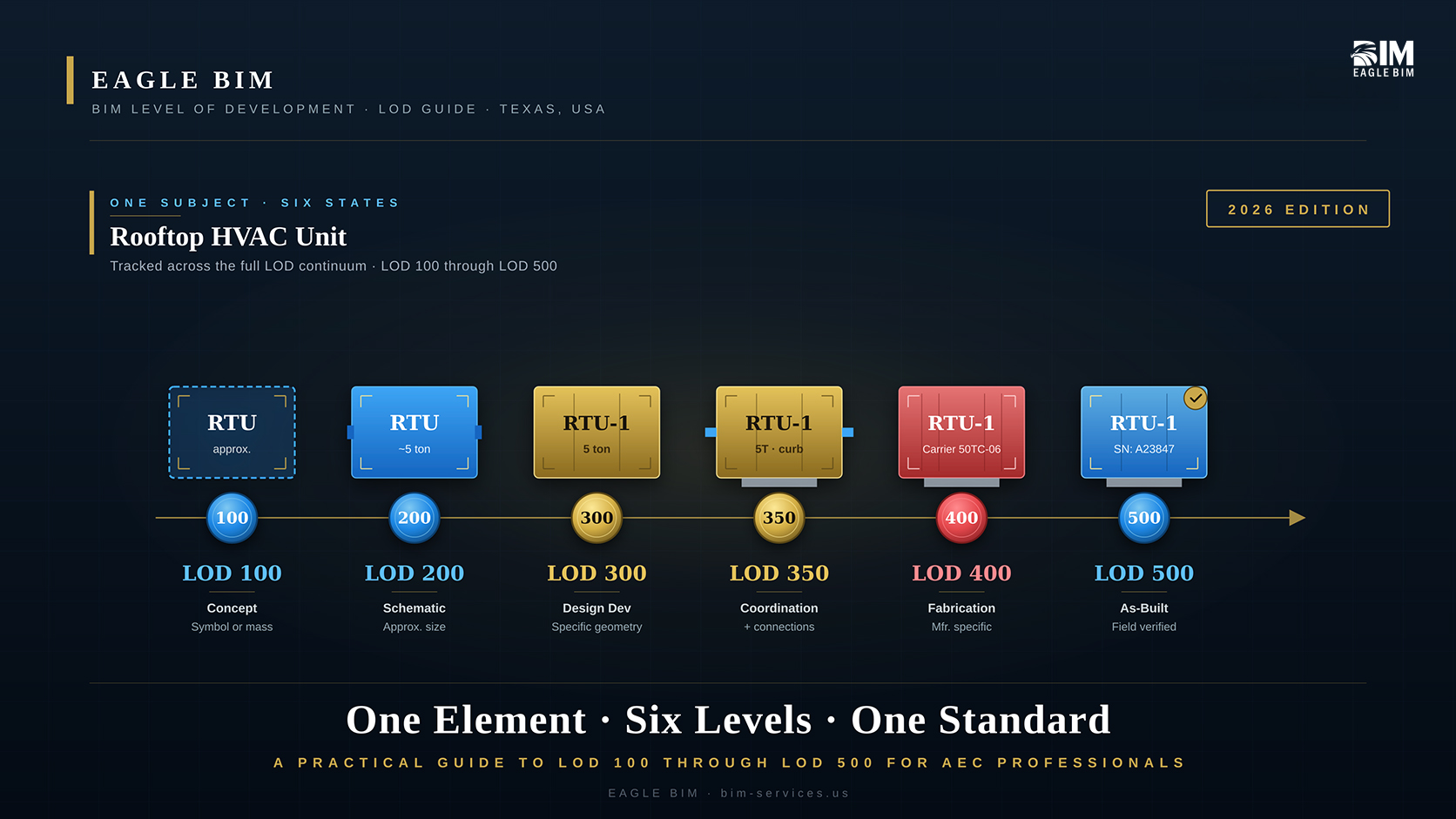
BIM level of development (LOD) is a standardized framework that describes how completely and reliably a model element has been developed at each stage of design and construction. The framework defines six standard levels: LOD 100 (conceptual mass), LOD 200 (approximate geometry), LOD 300 (accurate geometry), LOD 350 (geometry plus connections and interfaces for trade coordination), LOD 400 (fabrication-ready with manufacturer data), and LOD 500 (field-verified as-built). LOD is defined by AIA Contract Document E201-2022 (which covers 100, 200, 300, 400, and 500) and the BIMForum LOD Specification (which adds 350 and the practical 500 interpretation). LOD describes what a model element communicates and how reliably it can be used downstream, not just how detailed the geometry looks.
This guide walks through what BIM level of development actually means in practice, how each LOD definition from LOD 100 200 300 400 500 plus 350 applies to real elements, how LOD in BIM maps to project phases (SD, DD, CD, construction, operation), which disciplines hit which LOD targets and when, what the AIA LOD standard says versus how teams actually apply it, and how the BIM LOD specification from BIMForum extends the AIA framework. Written for general contractors, MEP subcontractors, architects, design managers, and BIM coordinators who need a practical understanding of how level of development BIM works on US commercial projects.
What Is BIM Level of Development?
BIM level of development (LOD) is a framework defined by the American Institute of Architects (AIA) and elaborated by BIMForum that describes the content and reliability of a BIM element at a specific point in the project. LOD is not the same as Level of Detail. Level of Detail describes how much visual detail an element has. Level of Development describes what an element actually represents and how confidently downstream users can rely on its data for cost estimating, coordination, fabrication, or facilities management. A wall modeled with rich texture rendering may still be only LOD 100 if its location and size are not committed. A wall modeled as a simple extrusion may be LOD 300 if its dimensions, layers, and location are accurate and contractually reliable.
BIM level of development exists because BIM projects depend on multiple teams using the same model for different purposes at different times. A cost estimator uses model quantities. A clash coordinator uses model geometry. A fabricator uses model dimensions and connections. A facilities manager uses model property data. Each use needs a different level of reliability from the model. LOD in BIM standardizes the language teams use to specify and agree on what level of reliability the model elements need to support at each project milestone.
The framework was first published by BIMForum in 2013 with regular updates. The current canonical references are the
AIA Contract Document E201-2022 BIM Exhibit, which defines LOD 100, 200, 300, 400, and 500 for contract purposes, and the
BIMForum Level of Development Specification (current edition published in 2024, with a 2025 edition recently released), which interprets the AIA definitions for specific building systems and adds the widely used LOD 350 for trade coordination. The BIM LOD specification is the operational document most BIM teams reference; the AIA document is the contractual anchor.
Level of Development vs Level of Detail
One clarification prevents most LOD arguments. The AIA LOD standard does not formally include LOD 350 or LOD 500 in its core list. BIMForum added LOD 350 because the AIA gap between 300 (accurate geometry) and 400 (fabrication-ready) was too wide for trade coordination work. BIMForum also added the practical interpretation of LOD 500 because the AIA definition is brief and project teams needed a working description of as-built model content. Both LOD 350 and the practical LOD 500 framing are industry conventions widely accepted in BIM level of development practice, even though they live outside the strict AIA E201-2022 list.
LOD 100 · Conceptual
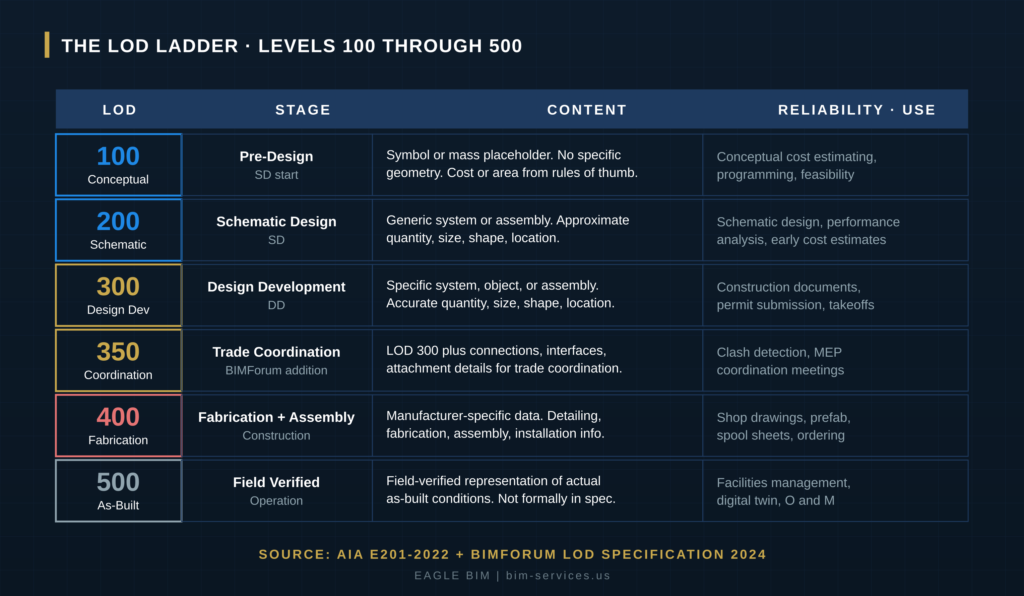
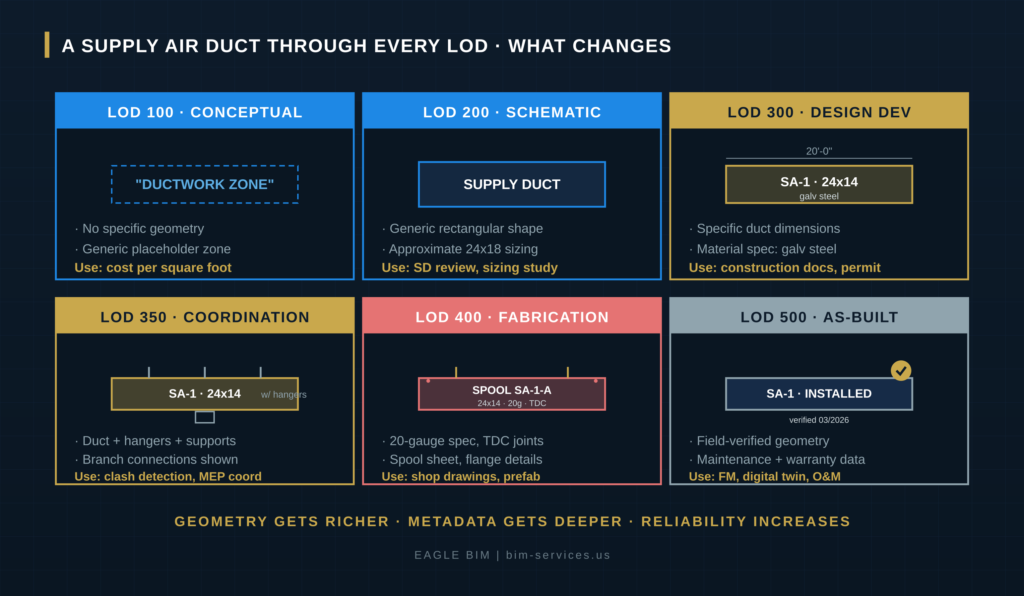
LOD 100 is a symbol or generic mass placeholder. The element is shown in the model but has no specific geometry. Cost estimating at LOD 100 happens by area or volume rules of thumb rather than from the modeled element. LOD 100 is appropriate for pre-design, conceptual cost studies, feasibility analyses, and programming. An LOD 100 mechanical system might be represented as a single block labeled MECHANICAL ZONE with no equipment, ducts, or piping shown. The reliability commitment at LOD 100 is essentially zero. Downstream users cannot rely on LOD 100 geometry for any takeoff, coordination, or fabrication decision.
LOD definition for level 100 sounds restrictive, and it is. The point of LOD 100 is to acknowledge that something will be there without committing to what. A pre-design study showing five mechanical zones across a floor plan tells the cost estimator there will be HVAC infrastructure, but it doesn’t commit the design team to specific equipment, capacity, or routing. That commitment comes at higher LODs.
Common BIM level of development misuse at this stage: teams sometimes use LOD 100 placeholders that look detailed (rendered with materials, sized to look like real equipment) and then downstream users mistake them for committed design. Strong BIM Execution Plans (BEPs) make the LOD intent explicit so a visual placeholder isn’t read as a design commitment.
LOD 200 · Schematic Design
LOD 200 is generic system or assembly with approximate geometry. Quantity, size, shape, location, and orientation are approximate. LOD 200 is appropriate for schematic design (SD), early performance analysis, and order-of-magnitude cost estimates. An LOD 200 air handling unit shows roughly the right size and location, with input and output port locations approximately correct, but the model is not yet committed to a specific manufacturer, model number, or detailed dimensions. The reliability commitment at LOD 200 is enough for design coordination at the assembly level but not for fabrication or detailed clash detection.
LOD 100 200 300 400 500 as a sequence is most useful when teams understand the transition between adjacent levels. The jump from LOD 100 to LOD 200 is the first real commitment in the BIM model. At LOD 200 the project team has decided that an air handling unit will exist in roughly that location and roughly that size. The unit can still change manufacturer, capacity, and detailed dimensions, but the spatial commitment is there. Cost estimates from LOD 200 models are more reliable than LOD 100 rules-of-thumb but still carry significant uncertainty.
LOD 200 is also where energy analysis, daylighting studies, and early constructability reviews typically begin. The model carries enough geometric content to support analysis tools, even though the geometry isn’t committed for construction. Teams running performance analysis at LOD 200 should document the assumptions used so downstream reviewers can validate them when the model advances to LOD 300.
What Does LOD 300 Mean in BIM Level of Development?
LOD 300 is a specific system, object, or assembly with accurate geometry. Quantity, size, shape, location, and orientation are accurate. LOD 300 is the standard target for design development (DD), construction documents (CD), permit submission, and most quantity takeoffs. An LOD 300 air handling unit has a specific make, model, and capacity. The unit’s dimensions match the manufacturer’s submittal data. Connection points are accurately located. The model can be used for design coordination, code review, and accurate quantity takeoffs. LOD 300 does not yet include connection details, hangers, supports, or interface coordination with adjacent trades.
LOD 300 is the workhorse of US commercial BIM. Most BIM level of development specifications target LOD 300 as the baseline for construction document deliverables. The vast majority of architectural and structural BIM work on commercial projects in the United States is delivered at LOD 300. The model is reliable enough for permit submission and code review, while remaining flexible enough to accommodate trade coordination and field adjustments downstream.
The line between LOD 300 and LOD 350 is where most BIM coordination arguments happen. A duct modeled at LOD 300 shows the duct accurately in size and location. The same duct at LOD 350 also shows its hangers, the wall penetration sleeve, the fire damper attachment, and the connection to the equipment it serves. Both models look similar at a casual glance. The reliability commitments are very different. Strong BIM LOD specification documents distinguish carefully between 300 and 350 to prevent coordination gaps from being papered over.
LOD 350 · Trade Coordination
LOD 350 extends LOD 300 to include the connections, interfaces, and attachment details needed for trade coordination. LOD 350 is the BIMForum-added level that does not formally appear in the AIA E201-2022 list. It exists because the gap between LOD 300 (accurate geometry) and LOD 400 (fabrication-ready) was too wide for trade-level clash detection. An LOD 350 duct shows hangers, supports, sleeves, fire dampers, and the specific connections to adjacent equipment and other systems. LOD 350 is the standard target for MEP coordination, clash detection, and Navisworks or Revizto federation work. Strong commercial MEP coordination projects almost always require LOD 350 for MEP and fire protection disciplines.
LOD 350 is where good level of development BIM practice diverges from generic BIM. At LOD 300 a designer can hand off the model and the MEP subcontractor can do their own detailing for coordination. At LOD 350 the design team commits to specific connections, attachment details, and trade interfaces in the model itself. The advantage is that downstream clash detection becomes meaningful: clashes between LOD 350 models are real spatial conflicts that have to be resolved, not artifacts of insufficient detail.
MEP coordination projects almost always require LOD 350 for BIM level of development deliverables. We covered this in detail in our
What Is MEP Coordination in BIM pillar blog. Without LOD 350 modeling, MEP clash detection generates noise. With LOD 350 modeling, every clash represents a real spatial conflict that the trades have to resolve in the OAC meeting. The cost difference between coordination at LOD 300 and coordination at LOD 350 is significant on the modeling side, but it’s recovered many times over in reduced field RFIs during construction.
LOD 400 · Fabrication and Assembly
LOD 400 is a model element with manufacturer-specific data and detailing, fabrication, assembly, and installation information. LOD 400 is the standard target for shop drawings, prefabrication, and spool-sheet generation. An LOD 400 duct includes the specific gauge, joint types, hanger spacing, support hardware, and fabrication-grade dimensional tolerances. Mechanical fabricators usually work in CADmep or specialty fabrication tools at LOD 400. The model is reliable enough that the fabrication shop can cut steel, assemble pre-built modules, and ship pre-finished assemblies to the field with confidence the field installation will work. LOD 400 is most common on mechanical, electrical, plumbing, and fire protection disciplines.
LOD in BIM at level 400 is the territory of trade subcontractors more than design firms. The design team rarely models at LOD 400. The MEP subcontractor’s fabrication detailer models at LOD 400, often starting from the design team’s LOD 350 coordinated model. Mechanical fabrication shops use the LOD 400 model to drive CNC cutting, plasma cutting, and welding stations directly. The AIA LOD standard recognizes LOD 400 as the appropriate target for fabrication-grade work.
Prefabrication is the biggest driver of LOD 400 adoption in US construction. Mechanical racks pre-assembled off-site, bathroom pods built in factories, and plumbing wet walls fabricated to specification all depend on LOD 400 BIM models. The BIM level of development work at LOD 400 pays for itself by enabling factory-quality fabrication, reducing field labor, compressing the project schedule, and improving installation quality. We’ve delivered LOD 400 MEP coordination across healthcare, data center, multifamily, and commercial sectors in Texas.
LOD 500 · Field-Verified As-Built
LOD 500 is a field-verified representation of actual as-built conditions. The AIA E201-2022 definition is brief, and BIMForum does not formally include LOD 500 in the LOD Specification because it sits outside the construction-document continuum. In practice, LOD 500 is the model used for facilities management, digital twin applications, and operations and maintenance handoff. An LOD 500 element has been field-verified to match what actually got installed. It typically carries property data like manufacturer, model number, serial number, warranty information, and links to O and M documentation. Hospital and university owners often require LOD 500 deliverables as part of the facilities handoff.
The line between LOD 400 and LOD 500 is the line between what was fabricated and what was actually installed. Field deviations from the model happen on almost every project. Walls move during construction. MEP routing shifts to avoid unexpected conditions. Equipment substitutions happen during procurement. The LOD 500 model captures the as-installed reality, not the as-designed intent. Updating the LOD 400 model to LOD 500 typically requires a scan to BIM survey of the completed work, model updates, and the property-data population that supports downstream facilities use.
BIM level of development at level 500 is where digital twin programs start. The owner’s facilities team uses the LOD 500 model as the foundation for ongoing operations. Maintenance work orders link to specific equipment in the model. Warranty tracking ties to the model elements. Future renovation projects start from the LOD 500 model rather than from re-scanning the building. Our published
Scan to BIM for healthcare renovations content covers the workflow for capturing existing conditions and producing LOD 500-grade as-built models. The same workflow applies to LOD 500 handoffs at construction completion.
| Need LOD-Compliant BIM Deliverables on Your Project?
Eagle BIM produces BIM level of development deliverables across the full LOD spectrum, from LOD 200 schematic models through LOD 400 fabrication-ready output. Texas and USA coverage across healthcare, data center, fab, multifamily, and commercial sectors. |
When Should You Use Each BIM Level of Development?
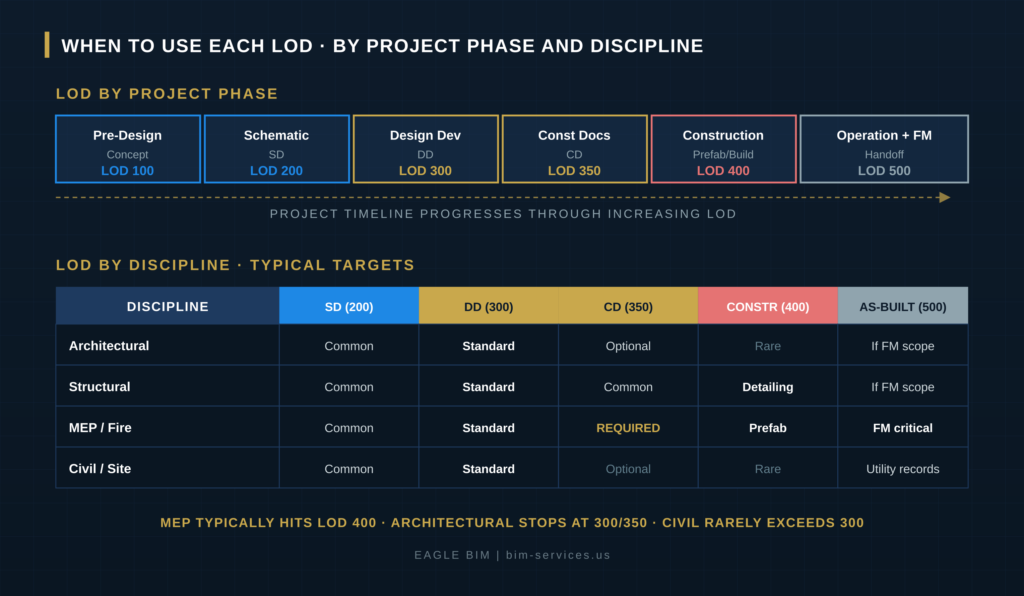
Each LOD aligns with a typical project phase. LOD 100 is appropriate for pre-design, programming, and feasibility studies. LOD 200 is the schematic design (SD) phase target. LOD 300 is the design development (DD) and construction documents (CD) target, and is the most common BIM deliverable on US commercial projects. LOD 350 is the trade coordination target during the late CD and early construction phases, when MEP coordination and clash detection drive the work. LOD 400 is the fabrication phase target, used by trade subcontractors for shop drawings, prefabrication, and spool-sheet generation. LOD 500 is the operations and facilities management target, produced after construction completion through field verification and property-data population.
The level of development BIM progression isn’t always linear. Some elements jump LOD levels: structural steel goes directly from LOD 300 design intent to LOD 400 fabrication detailing in Tekla without an intermediate LOD 350 stop. Some elements never reach the higher LODs: ceiling tiles and finishes rarely advance past LOD 300 because there’s no fabrication or facilities management value at higher LODs. Strong BIM Execution Plans specify the LOD target by element category, not just one LOD for the entire project.
The BIMForum specification is element-by-element, not project-wide, for this reason. The BIM LOD specification explicitly defines LOD targets for hundreds of specific building elements organized by CSI Uniformat 2010. Walls, slabs, beams, columns, ductwork, piping, electrical equipment, fire protection systems, finishes, and site work all have their own LOD progression definitions. Teams that use the BIMForum specification correctly assign LOD targets at the element category level, which is far more useful in practice than a project-wide statement like ‘this project will be modeled at LOD 300’.
Which Discipline Hits Which LOD on a Commercial Project?
Different disciplines hit different LOD targets at different times. MEP (mechanical, electrical, plumbing, fire protection) typically advances all the way to LOD 400 because prefabrication and shop drawing production demand fabrication-grade detail. Structural usually advances to LOD 400 for steel fabrication and detailing in Tekla. Architectural typically stops at LOD 300 or LOD 350 because higher LODs add fabrication detail that has limited downstream value. Civil and site work rarely exceed LOD 300. Facilities-relevant disciplines (equipment that the owner will maintain) often advance to LOD 500 as part of the operations handoff, while purely architectural finishes and non-maintainable elements stop at the design LOD.
The BIM level of development discipline matrix matters because BIM Execution Plans (BEPs) must specify LOD targets by discipline to avoid coordination mismatches. If mechanical comes in at LOD 350 with full hangers and supports modeled while plumbing comes in at LOD 300 generic geometry, the clash detection between them generates noise from the LOD mismatch rather than identifying real conflicts. Good BEPs enforce LOD alignment across disciplines at each coordination milestone, regardless of whether the final target LOD differs by discipline.
Eagle BIM’s standard intake process audits the LOD assumptions across all incoming disciplines in the first week of any BIM level of development engagement. Mismatches get flagged before the first clash detection cycle. We’ve delivered LOD 100 200 300 400 500 work across every major commercial sector in Texas, and the discipline-by-discipline LOD alignment is the single biggest predictor of coordination success.
AIA E201-2022 and the BIMForum LOD Specification
Two foundational documents define LOD for US commercial BIM. AIA Contract Document E201-2022, BIM Exhibit for Sharing Models with Project Participants, defines LOD 100, 200, 300, 400, and 500 in contractual language. The BIMForum LOD Specification, current edition 2024 with 2025 in the public-comment process, interprets the AIA definitions for hundreds of specific building elements organized by CSI Uniformat 2010, and adds LOD 350 for trade coordination. The two documents work together: AIA E201-2022 provides the legal framework, and the BIMForum specification provides the operational interpretation. Strong BIM Execution Plans cite both.
The AIA LOD standard E201-2022 succeeded the earlier G202-2013 BIM Protocol Form. Teams that started BIM practice before 2022 may still reference G202 in legacy documents, but the current contractual reference is E201-2022. The 2022 update aligned the AIA contract language with how BIM is actually delivered on commercial projects today: more emphasis on model federation, clearer language on intellectual property in shared models, and updated definitions that reflect over a decade of industry practice.
The BIMForum LOD Specification has been published annually since 2013 by BIMForum, an industry council operating under the Associated General Contractors of America (AGC). The
BIMForum LOD Specification is free to download and is the most widely referenced operational BIM LOD specification in US commercial construction. The 2024 edition is the most recent finalized version. The 2025 edition is in public comment as of late 2025. The specification has matured significantly since the first 2013 release: the current version covers far more elements with more nuanced LOD definitions, and the BIMForum working group includes contributors from design firms, GCs, MEP subcontractors, and BIM consultants across the industry.
One factual note worth knowing. There are two separate organizations using BIMForum in their name: BIMForum (USA), which publishes the canonical LOD Specification under AGC affiliation, and BIMForum Global, a separate organization. BIMForum (USA) has publicly stated that BIMForum Global is not licensed to publish or modify the BIMForum LOD Specification. Teams citing LOD documents should verify they’re working from the AGC-affiliated BIMForum (USA) publications to avoid contractual ambiguity.
What Are the Most Common BIM Level of Development Mistakes?
The most common LOD mistakes are (1) treating LOD as a project-wide target instead of an element-by-element specification, (2) confusing Level of Development with Level of Detail and assuming rendered detail equals committed design, (3) mismatching LOD across disciplines so clash detection generates noise instead of identifying real conflicts, (4) jumping from LOD 200 directly to LOD 400 without an intermediate LOD 300 or 350 stop for trade coordination, (5) ignoring the BIMForum element-by-element specification and writing BEPs at the project level only, and (6) treating LOD 500 as the same content as LOD 400 instead of recognizing the field-verification step that distinguishes them.
The biggest BIM level of development failure mode on commercial projects is LOD mismatch at coordination time. Mechanical comes in at LOD 350 with full coordination geometry. Plumbing comes in at LOD 300 with no hangers or branch connections shown. Electrical comes in at LOD 200 with generic cable tray placeholders. Fire protection comes in with a separate authoring tool that exports at a hybrid LOD. The federated model that results is uncoordinatable because the disciplines aren’t speaking the same LOD language. The fix is upstream BEP discipline that aligns LOD targets across all trades at each coordination milestone.
The second common failure is LOD confusion with visual detail. A wall rendered with full texture mapping looks more developed than a plain extruded wall. The rendered wall might still be at LOD 100 if its dimensions and location aren’t committed. The plain wall might be at LOD 300 if its dimensions are accurate and contractually reliable. LOD in BIM describes commitment and reliability, not visual fidelity. Teams that conflate the two end up making downstream decisions based on visual perception of detail rather than actual model reliability.
We covered LOD mismatch as one of the most common BIM coordination failures in our content roadmap. Strong BIM coordination services enforce LOD discipline through the BEP and through the intake audit at week one. Our published
What Is BIM Coordination and How Does It Work pillar blog walks through the broader coordination workflow that depends on LOD alignment.
How Eagle BIM Delivers LOD-Compliant BIM Services
Eagle BIM delivers BIM services across the full LOD spectrum. Our standard MEP coordination engagement produces LOD 350 models for clash detection and OAC meetings. Our shop drawing services produce LOD 400 fabrication-ready output. Our scan to BIM services produce LOD 500 as-built models with field-verified geometry and property data. Our intake audit catches LOD mismatches across incoming disciplines in week one of every engagement. We work to the AIA E201-2022 framework and the BIMForum LOD Specification 2024 as our baseline standards. We adapt to project-specific BEPs and owner standards when those impose tighter or looser LOD requirements.
Our BIM level of development practice covers Texas (Houston, Dallas-Fort Worth, Austin, San Antonio) and the broader USA. We work across healthcare (TMC, MD Anderson, Memorial Hermann, Baylor), data centers (DFW and Austin hyperscale), semiconductor fabs (Samsung Taylor, TI Sherman), multifamily (Avalon Northwest Hills, Westbend Residences), and commercial sectors. Each sector has different LOD expectations: hospital MEP routinely targets LOD 400 for prefab readiness, fab cleanrooms target LOD 400 with extreme dimensional tolerances, multifamily targets LOD 350 for repeating-unit coordination, and commercial Class A targets LOD 300 to 350 for most disciplines.
Industry resources for BIM level of development work include the BIMForum LOD Specification (free download), the AIA Contract Documents family including E201-2022, and the National BIM Standard (NBIMS-US) published by the National Institute of Building Sciences. Eagle BIM works to all three as a baseline. The BIM LOD specification deliverable for each project gets tuned to the owner’s specific requirements and the project’s BEP.
Frequently Asked Questions
What is Level of Development in BIM?
Level of Development (LOD) is a framework that describes how completely and reliably a BIM element has been developed at a specific point in the project. The framework defines six standard levels: LOD 100 (conceptual mass), LOD 200 (approximate geometry), LOD 300 (accurate geometry), LOD 350 (geometry plus connections), LOD 400 (fabrication-ready), and LOD 500 (field-verified as-built). LOD is defined by AIA Contract Document E201-2022 and elaborated by the BIMForum LOD Specification.
What is the difference between Level of Development and Level of Detail?
Level of Development describes the reliability of a model element (its committed dimensions, location, and metadata). Level of Detail describes how much visual detail the element has (its texture, rendering, geometric complexity). A simple rectangular extrusion can be LOD 300 if its dimensions are accurate and committed. A photorealistic rendered element can still be LOD 100 if its dimensions are not committed. LOD is about reliability, not appearance.
What does LOD 300 mean?
LOD 300 is a specific system, object, or assembly with accurate geometry. The model commits to specific make, model, dimensions, and location. LOD 300 is the standard target for design development (DD), construction documents (CD), permit submission, and most quantity takeoffs. The vast majority of architectural and structural BIM work on US commercial projects is delivered at LOD 300.
What does LOD 350 mean?
LOD 350 extends LOD 300 to include connections, interfaces, and attachment details needed for trade coordination. LOD 350 includes hangers, supports, sleeves, connection points, and trade interfaces. LOD 350 is the BIMForum-added level (not in AIA E201-2022) that bridges the gap between LOD 300 design intent and LOD 400 fabrication detail. LOD 350 is the standard target for MEP coordination, clash detection, and federated model work.
What does LOD 400 mean?
LOD 400 is a model element with manufacturer-specific data and detailing, fabrication, assembly, and installation information. LOD 400 is the standard target for shop drawings, prefabrication, and spool-sheet generation. Mechanical fabrication shops, electrical fabricators, and plumbing prefab teams typically work at LOD 400. The model is reliable enough to drive CNC cutting, factory assembly, and pre-finished module delivery to the field.
What does LOD 500 mean?
LOD 500 is a field-verified representation of actual as-built conditions, typically with property data populated for facilities management. LOD 500 sits outside the AIA E201-2022 design-and-construction continuum and is most commonly produced by scan to BIM verification after construction completion. Owners (especially hospitals and universities) often require LOD 500 deliverables as part of the facilities and operations handoff.
Is LOD 250 a real level?
LOD 250 does not appear in the canonical AIA E201-2022 standard or the AGC-affiliated BIMForum (USA) LOD Specification 2024. A separate organization called BIMForum Global has proposed an LOD 250 in its 2025 LOD document, but BIMForum (USA) has publicly stated that BIMForum Global is not licensed to publish or modify the BIMForum LOD Specification. For US commercial BIM contracts, the standard levels are 100, 200, 300, 350, 400, and 500. Project teams that need an intermediate level between 200 and 300 should specify the actual requirements in the BEP rather than relying on a contested LOD designation.
What document should we cite for LOD in a BIM Execution Plan?
Cite both AIA Contract Document E201-2022 (the contractual framework) and the BIMForum LOD Specification 2024 (the operational interpretation). Most US commercial BIM Execution Plans reference both documents in the LOD requirements section. The AIA document provides the legal anchor; the BIMForum specification provides the element-by-element interpretation that lets coordinators verify whether a specific element meets the target LOD.
| Need Help With LOD-Compliant Deliverables?
Send Eagle BIM your project scope, BEP draft, and target LOD requirements. We will come back with a BIM level of development proposal that aligns with AIA E201-2022 and the BIMForum LOD Specification, scaled to your project’s actual coordination and delivery needs. |