
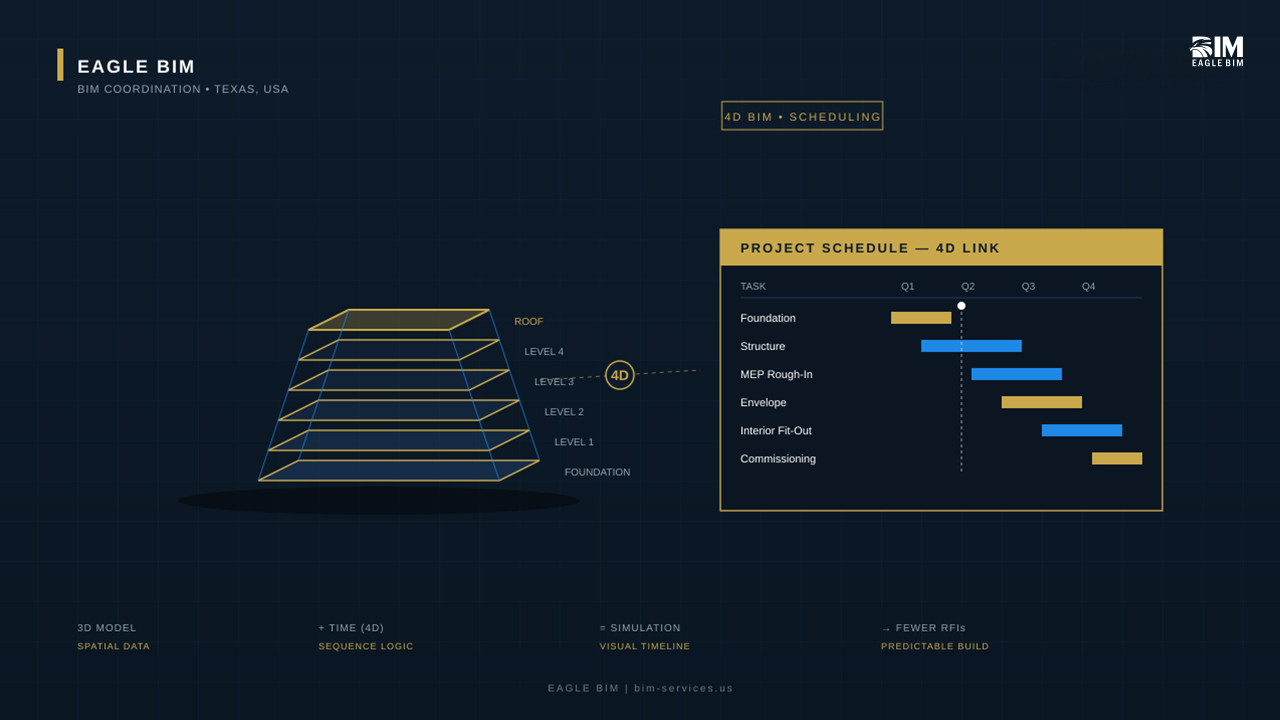
Most construction delays don’t start in the field — they start on a Gantt chart that nobody can really see. A flat schedule shows you tasks. It doesn’t show you what the building actually looks like in week 14, where the tower crane is sitting, or whether the structural steel crew and the MEP crew are about to fight over the same floor on the same day. That’s the gap 4D BIM services close. By linking a coordinated 3D model to the project schedule, contractors get a moving, visual playbook of how the building goes up — phase by phase, trade by trade, week by week.
This article breaks down what 4D BIM services actually deliver, how 4D BIM construction simulation differs from a normal 3D model, the workflow behind BIM schedule integration, and where general contractors, MEP subs, and owners get the most value. If you’re a project manager evaluating 4D BIM services for your next hospital, high-rise, or industrial build, this is the operator-level overview written for people who actually build things in Texas and across the U.S.
Construction sequencing BIM has moved from a tier-one differentiator to a baseline expectation on most U.S. commercial projects above $50 million. Owners are asking for project timeline BIM deliverables in their preconstruction RFPs, lenders are referencing them in financing milestones, and field teams are using them every Tuesday morning in look-ahead meetings. Navisworks 4D and Bentley Synchro have become the two dominant simulation platforms, and BIM schedule integration is now a documented capability that GCs evaluate when shortlisting BIM partners.
What Is 4D BIM
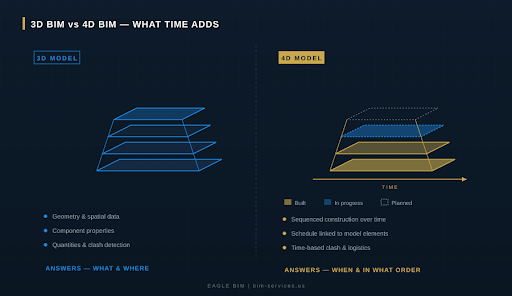
4D BIM is the practice of attaching a time dimension to a 3D Building Information Model. The 3D model carries spatial data — geometry, components, properties, quantities. The fourth dimension is time, which means every modeled element is linked to a task in the construction schedule. When you scrub through the resulting simulation, you watch the project build itself in the order it will actually be built on site.
Where a traditional schedule lives in Microsoft Project or Primavera P6 as bars on a chart, 4D BIM services turn those bars into something a foreman, a superintendent, or an owner can actually understand at a glance. You’re not interpreting a Gantt — you’re watching a building rise. That single change in representation rewires how the entire project team plans, communicates, and resolves conflicts.
In practice, 4D BIM services are usually delivered as a federated model in Navisworks or Synchro, a linked schedule, an animation video, and a set of look-ahead views the field team can pull up on a tablet. The deliverable isn’t the model — it’s clarity. The team stops arguing about what week 22 looks like and starts solving the actual problems that show up in week 22.
How 4D Differs from 3D BIM
The shortest answer — 3D answers what and where. 4D answers when and in what order. A 3D BIM model is a static digital twin of the finished building. Pull up any view, and you see the design as it will exist on day one of occupancy. That model is enormously useful for clash detection, quantity take-offs, and shop drawing coordination, but it has nothing to say about the construction process itself.
Construction sequencing BIM adds the missing layer. Each modeled element — a column, a duct run, a slab pour — is tagged with start and finish dates pulled from the project schedule. Run the simulation forward and the model assembles in real time, exactly as the schedule predicts. Run it backward and you can audit how the team got into a particular bottleneck. Either way, the visualization exposes assumptions that flat schedules quietly hide.
There’s also a quality dimension. Recent academic research published by MDPI has flagged that as much as 70% of traditional construction schedules are non-optimized when they leave preconstruction. BIM schedule integration forces those gaps into the open before a single shovel hits the dirt, which is exactly when they’re cheapest to fix.
How 4D BIM Works
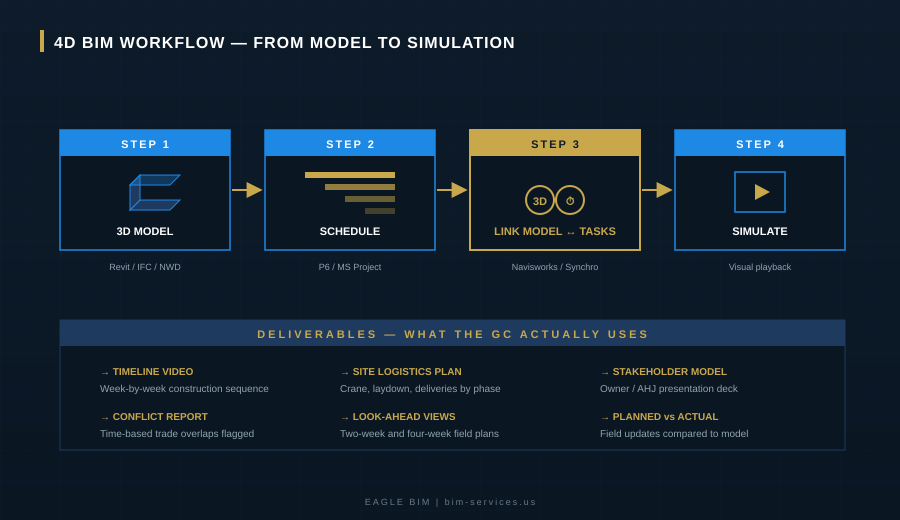
4D BIM services follow a repeatable four-step workflow. The exact tools change from project to project — some teams run Navisworks against P6, others run Synchro against MS Project — but the underlying mechanics are consistent. Here’s how a typical 4D BIM construction simulation comes together for a U.S. commercial or institutional project.
Linking the Model to the Schedule
Step one is making sure both inputs are clean. The 3D model needs to be properly broken down into work packages — a slab modeled as one element won’t simulate well if it’s being poured in five sections. The schedule needs to match that breakdown. Once both line up, modelers use a 4D BIM construction simulation tool — most commonly Navisworks 4D or Bentley Synchro — to map every model element to its corresponding task. This is what BIM schedule integration actually means at a working level.
Good 4D BIM services teams don’t accept the schedule as gospel. They review it for sequencing logic, missing dependencies, and unrealistic durations. A floor that’s marked to be poured, framed, sheathed, and finished in eight days isn’t a 4D problem — it’s a planning problem the model just exposed.
Simulation
Once the link is built, the simulation runs. Modelers play back the schedule day by day, week by week, or month by month depending on the level of detail required. They check that elements appear in the right sequence, that nothing erects itself before its supports are in place, and that the visual narrative matches the contractor’s intent. This is where the first round of corrections usually happens — it’s almost impossible to watch a 4D playback without noticing at least a handful of things that need to be re-sequenced.
A mature 4D BIM construction simulation doesn’t stop at one playback. The team produces phased views, exception views, and trade-specific cuts of the simulation so each subcontractor can see exactly when their scope hits each area. Project timeline BIM done at this depth becomes a coordination tool rather than just a visualization tool — and that distinction is where most of the field-level value sits.
For complex projects, the team often produces multiple simulation variants — best case, expected case, and recovery scenarios. Project timeline BIM becomes a planning sandbox rather than a single fixed deliverable.
Conflict Identification
Time-based clash detection is where 4D BIM services generate hard, defensible value. A standard 3D clash report tells you a duct intersects a beam — useful information, but you’d catch it eventually anyway. A 4D conflict report tells you that on April 14th, the steel crew, the MEP rough-in crew, and the curtain wall installation team are all scheduled to be working on the same floor in the same window. That’s not a model issue. That’s a $40,000 day of standing crews.
Construction sequencing BIM also surfaces logistics conflicts that don’t appear in any other planning artifact — crane swing overlap with rebar deliveries, lay-down areas double-booked between trades, hoist availability conflicts on phased pours. These are the issues that turn into RFIs or, worse, change orders during the build.
| Get a 4D Simulation Built for Your Next Project
Eagle BIM delivers 4D BIM services tied to your real Primavera or MS Project schedule — built in Navisworks or Synchro, ready for OAC meetings, look-ahead planning, and field-level coordination. Texas-based, contractor-facing, and built around how GCs actually work. |
Benefits of 4D BIM
There’s no shortage of marketing material claiming that BIM in general improves construction outcomes. The narrower question — what do 4D BIM services specifically deliver — has a more concrete answer. Here are the four benefits that show up most reliably on real projects.
Better Planning
Project timeline BIM exposes planning errors during preconstruction, when they cost almost nothing to fix. The simulation makes it obvious when a sequence is unrealistic, when a milestone is out of order, or when a critical-path activity is being driven by the wrong predecessor. Once the field team has watched the simulation, the conversation shifts from “is this schedule possible” to “what do we need to adjust to make it possible.” Strong BIM schedule integration at this stage means every modeled element is already tied to its corresponding task, so adjustments propagate through the simulation immediately rather than requiring a manual rebuild.
This is also where 4D BIM services deliver value to project managers running parallel scope packages. You can validate that the curtain wall, MEP rough-in, and structural pours don’t compete for the same floor in the same week — and if they do, you can adjust before any of those subs are mobilized.
Stakeholder Buy-In
Owners, financiers, and AHJ reviewers don’t read Gantt charts. Many of them can’t read a Revit model either. But everyone — owner, lender, fire marshal, council member — can watch a 90-second video of a building rising over twelve months. That single deliverable can resolve more questions in a single meeting than a stack of bid documents would in a week. 4D BIM construction simulation is, among other things, the most effective communication tool a project team has.
This communication value compounds across the project lifecycle. The same 4D BIM construction simulation used to win owner buy-in in preconstruction can be re-cut for community meetings, used in marketing for pre-leasing, shown to neighborhood associations during permitting, and used internally for safety orientation when crews mobilize. One project timeline BIM deliverable feeds half a dozen downstream uses, which is part of why the ROI math on these services has gotten so favorable in the last few years.
Industry coverage from outlets like Building Design + Construction has consistently noted that owner engagement is one of the strongest predictors of project success — and visual tools like 4D BIM construction simulation are how that engagement happens in practice.
Fewer Delays
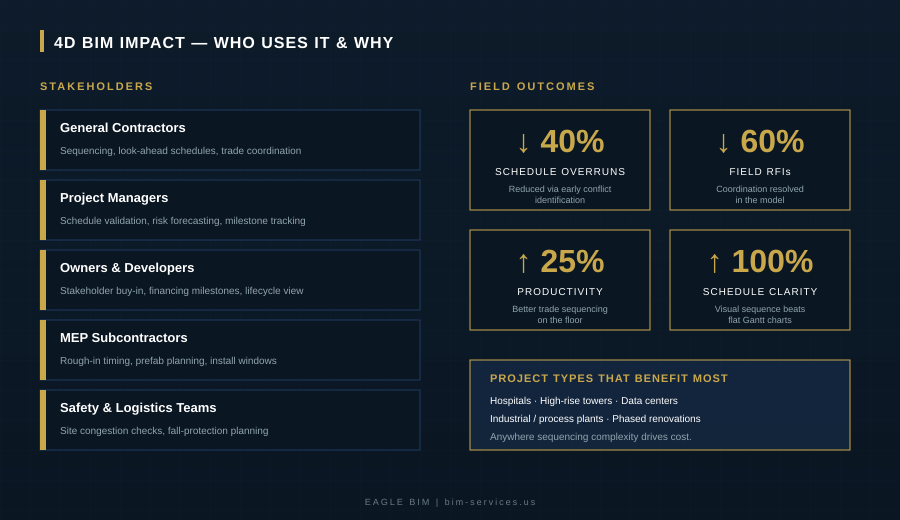
Time-based clash detection plus better sequencing logic plus visual stakeholder communication adds up to one outcome — fewer delays. Industry data from Navisworks 4D and Synchro case studies routinely cites schedule overrun reductions in the 20–40% range when 4D BIM services are deployed at preconstruction and maintained through the build.
The mechanism isn’t magic. It’s that more conflicts get caught earlier, more sequencing problems get fixed before they go vertical, and more stakeholders make their decisions on time because they understand what they’re being asked to approve.
Who Uses 4D BIM
4D BIM services aren’t just for tier-one general contractors. The set of stakeholders who get measurable value from construction sequencing BIM is broader than most people assume.
4D BIM construction simulation is also valuable for facility owners who need to maintain operations during phased renovations. A simulation showing that wing B comes offline for four weeks in Q3, then back online while wing C goes dark, is something an operations director can actually act on — staffing, patient routing, tenant notifications, all driven from one visual.
Insurers, lenders, and risk managers are also starting to ask for project timeline BIM deliverables on larger projects. A clear 4D BIM construction simulation tied to the financing schedule lets the underwriter see exactly when the project hits each value-creation milestone, which often shortens approval cycles. The same simulation supports any subsequent claim or dispute work — a documented, time-stamped model of the planned build is hard evidence in a way that a static schedule simply isn’t.
General Contractors and Project Managers
GCs are the natural primary user of 4D BIM services. Superintendents use the simulation for trade coordination meetings, project managers use it for owner reporting, schedulers use it to validate logic. Once a team has used a Navisworks 4D deliverable on one project, it’s hard to go back to flat schedules on the next one.
Owners and Developers
Owners use 4D BIM services for executive reporting, financing milestone reviews, and stakeholder communications. For developers running multi-phase projects — campus expansions, master-planned communities, multi-tower developments — project timeline BIM is essential for coordinating phased openings and keeping early phases productive while later phases are still under construction.
4D BIM on Complex Projects
Some project types benefit from 4D BIM services more than others. The pattern is consistent — wherever sequencing complexity drives cost, 4D BIM construction simulation pays for itself many times over.
Hospitals and Healthcare
Hospital construction is sequencing-heavy by definition. Phased renovations on operating facilities, infection control protocols, complex MEP systems, and AHJ coordination all stack up. 4D BIM services on a hospital project let the team simulate which areas are offline at which times, where temporary partitions go up, how patient routing changes phase by phase, and how the OR schedule recovers as each phase completes.
High-Rise and Vertical Construction
On a 30-story tower, construction sequencing BIM is how you coordinate the structural pour cycle with the curtain wall jump and the MEP rough-in. Each of those crews wants to be on its own optimal cycle, but the building only allows one cycle at a time. The 4D simulation is where those competing cycles get reconciled before the first column goes up.
Vertical projects also stress BIM schedule integration harder than most other typologies. A change to the formwork strip cycle ripples into MEP rough-in dates, which ripples into envelope close-in, which ripples into interior trades and commissioning. Navisworks 4D simulations make those ripple effects visible immediately. Without that visibility, schedule revisions become a slow, error-prone process that often arrives too late to actually help the field.
Industrial and Process Facilities
Data centers, semiconductor fabs, manufacturing plants — all of them have heavy MEP content, tight equipment delivery windows, and precise commissioning sequences. Navisworks 4D simulations on these projects typically run alongside the equipment vendor schedules, and the value isn’t just sequencing — it’s making sure the building is ready exactly when the long-lead equipment arrives, not three weeks early or two days late. For these project types, 4D BIM construction simulation also feeds directly into commissioning planning — the simulation shows when each room, panel, and system reaches a state where commissioning agents can start their work, which directly affects the certificate-of-occupancy date.
Most of these complex builds rely on tight BIM schedule integration from day one. The project timeline BIM deliverable becomes the single source of truth that the GC, MEP subs, equipment vendors, and commissioning team all reference. Construction sequencing BIM on a process facility isn’t a nice-to-have — it’s the only way to coordinate everyone against the same fixed equipment delivery dates.
Eagle BIM 4D Services
Eagle BIM, in association with BIMPRO LLC out of Pflugerville, Texas, delivers 4D BIM services scoped for the way U.S. general contractors and MEP subs actually run their projects. The deliverables are build-ready, the workflow runs against your existing P6 or MS Project file, and the model is delivered in whichever simulation platform fits your team — Navisworks, Synchro, or both.
Our BIM schedule integration workflow starts by reviewing the 3D coordination model and the master schedule for compatibility. We break work packages down to a level that simulates cleanly, link every modeled element to a schedule task, and run validation passes for both spatial and temporal logic. The output is a simulation you can actually use — not a flashy video that looks good in a pitch deck and breaks the moment a real schedule revision lands.
Eagle BIM’s edge over national project timeline BIM providers is straightforward — we’re Texas-based, contractor-facing, and we deliver against shop-drawing-ready coordination, not just preconstruction marketing. Fewer RFIs, faster approvals, and a model that holds up when the schedule shifts in week six.
Beyond 4D BIM services, our team also handles MEP BIM coordination, clash detection, scan-to-BIM, structural BIM, Revit family creation, shop drawings, and full BIM consulting. For most clients, 4D BIM construction simulation is layered on top of an existing coordination effort — the 4D layer adds the time dimension to work that’s already been done in 3D, which is where the integration savings come from.
Closing the Gap Between Plan and Build
Construction projects don’t fail because the team didn’t have a schedule. They fail because the schedule didn’t survive contact with the real building. 4D BIM services close that gap by turning the schedule into something the entire project team can see, interrogate, and improve — long before steel arrives on site.
If your next project has phased work, sequencing complexity, or owner stakeholders who need to understand the timeline at a glance, 4D BIM construction simulation is no longer optional. It’s how serious GCs run preconstruction in 2026. The teams that build the simulation in week one are the teams that aren’t fighting fires in week thirty. A solid 4D BIM construction simulation pays for itself the first time it surfaces a sequencing conflict that would have cost two weeks of crew time to fix in the field.
Construction sequencing BIM done well isn’t a presentation tool. It’s an operational asset. And the firms that treat it that way — including the GCs and developers across Texas Eagle BIM works with — are the ones consistently finishing projects on time and within budget. Whether the platform is Navisworks 4D, Synchro, or a hybrid stack, the underlying value comes from the same place — disciplined BIM schedule integration that ties every model element to a real task on a real schedule, not a marketing animation.
| Plan Smarter. Build Faster. Talk to Eagle BIM
Whether you’re running a hospital expansion, a high-rise tower, or an industrial process facility, Eagle BIM’s 4D BIM services give your team the visibility to plan smarter, sequence tighter, and finish on schedule. Texas-based. Build-ready. Contractor-facing. |